TEMP209
📑 Table of Contents
- Project Overview
- Design Philosophy
- Key Features
- MCU Compatibility
- Pin Mapping
- 7-Segment Display
- IR Remote Control (RC5)
- Serial Commands
- Configuration Menu
- Thermal Control Logic
- SoifGo Mobile Interface
- Fault & Safety
- Hardware
- Current Sensing with Hall Sensor
- 8-Hour Temperature Logger
- Debugging
- Building & Programming
- Downloads & Links
- Test Videos
- Changelog
- About & License
1. Project Overview
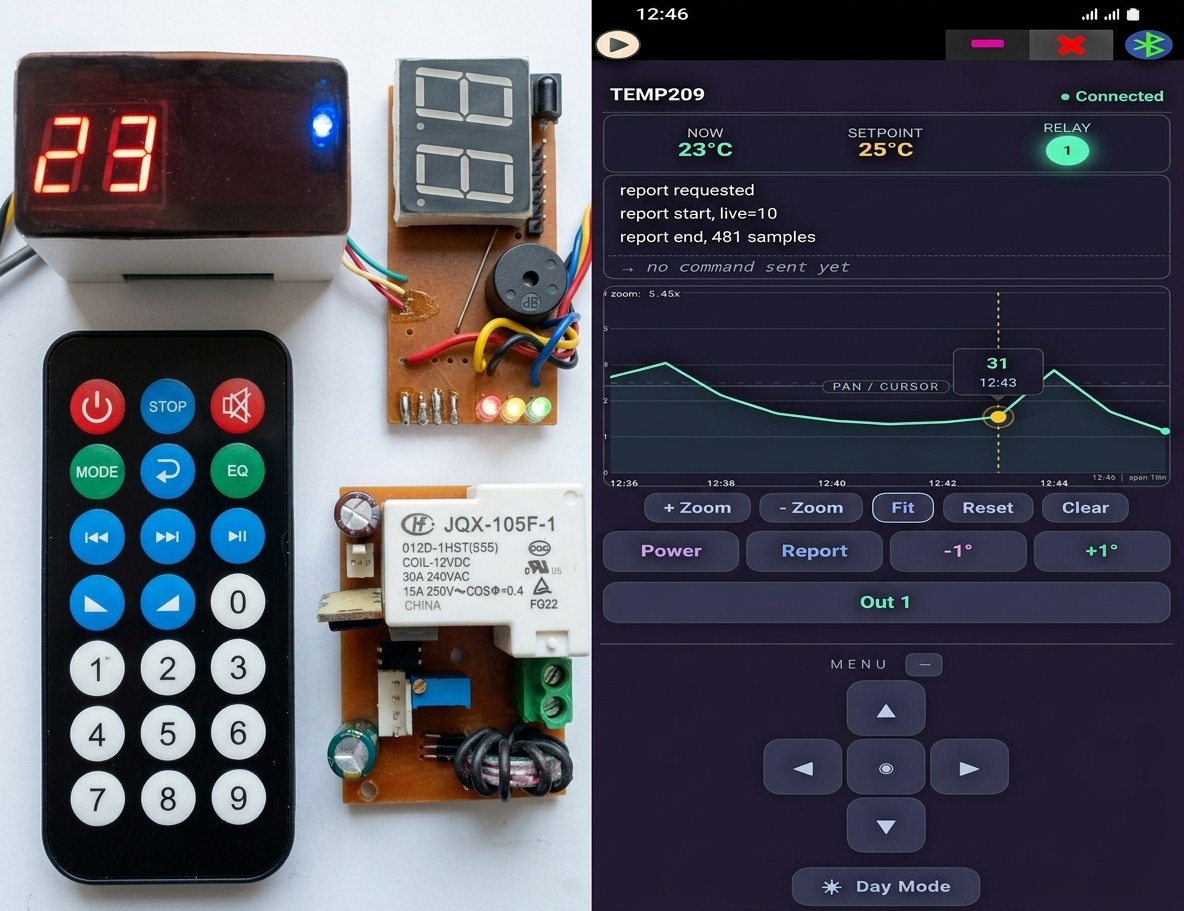
TEMP209 is a compact, open-source digital temperature controller designed for the ATmega microcontroller family (ATmega8 / 88P / 328). It reads temperature from a DS18B20 sensor, displays it on a multiplexed 2-digit 7-segment display, and manages thermal and user-defined outputs.
The project is written in BASCOM-AVR and released for educational and open-source purposes.
- Temperature Range: 0°C to 99°C
- Sensor: DS18B20 (1-Wire protocol)
- Display: Multiplexed 2-digit 7-segment
- Remote Control: RC5 infrared protocol
- Outputs:
Out1(reserved),Temp_out(thermal control) - Safety: Fault input (PORTC.3) — can be disabled or given 1–9 s delay
- Storage: EEPROM for settings and data logging
- MCU Support: ATmega8, ATmega88P, ATmega328 — separate firmware for each
2. Design Philosophy
TEMP209 uses a simple thermal controller to demonstrate alternative design choices.
❓ Why no physical buttons?
On ATmega8 and ATmega88P, the 8 KB flash is fully used — there is no room left for button-handling code, and there aren't enough free pins either.
On ATmega328, physical buttons can be added using ADC (analog keypad on a single pin).
In this design, however, the preference is toward remote + Bluetooth control — not because buttons are impossible, but because it avoids the difficulty of button placement, wiring, and mechanical design. A ready-made, elegant, optimized IR remote offers clean remote control with zero mechanical complexity:
- The user can apply settings without approaching the controller — comfortably from anywhere.
- Example: adjusting AC temperature from the couch.
- Removing physical buttons → cleaner, cheaper, more robust design.
3. Key Features
🌡️ Temperature Measurement
- DS18B20 sensor with 1-Wire protocol
- Range: 0°C to 99°C
- 1°C resolution
- Updated every 1 second
🖥️ Display
- Multiplexed 2-digit 7-segment display
- 10-level brightness control
- Special characters: P, b, d, F, H, L
🎛️ IR Remote Control
- RC5 protocol
- Full control without touching the device
- Supports multi-command remotes
- Any RC5 remote can be defined
🔌 Outputs
- Temp_out (PORTC.4): thermal control relay output
- Out1 (PORTC.5): user relay — reserved
- Buzzer (PORTC.0): alert buzzer
🌡️ Control Modes
- Heating (Heat): relay ON when temp < Setpoint
- Cooling (Cool): relay ON when temp > Setpoint + Delta
- Hysteresis (Delta): prevents relay chatter
- Protection Delay: protects compressor
🛡️ Safety & Fault
- Fault input (PORTC.3) — configurable reaction delay
- F=0 disables fault monitoring · F=1..9 adds 1–9 second delay
- Displays blinking "FF" on fault
- Sends
Faulton serial - Sensor disconnection detection
💾 Memory & Logging
- Settings stored in EEPROM
- Temperature logged every 1 minute
- Capacity: 480 samples (8 hours)
- Retrieve with
reportor IR command
📡 Serial Communication
- UART at 9600 baud — the standard default for common Bluetooth modules
- Simple text commands
- Live debug output
- Mobile app integration (SoifGo)
🔋 Stability
- Auto-save setpoint
- Restores state after power loss
- Compatible with 3 MCU models
4. MCU Compatibility
| MCU | Flash | SRAM | EEPROM | Status |
|---|---|---|---|---|
| ATmega8 | 8 KB | 1 KB | 512 B | Supported |
| ATmega88P | 8 KB | 1 KB | 512 B | Current source target |
| ATmega328 | 32 KB | 2 KB | 1 KB | Supported |
5. Pin Mapping
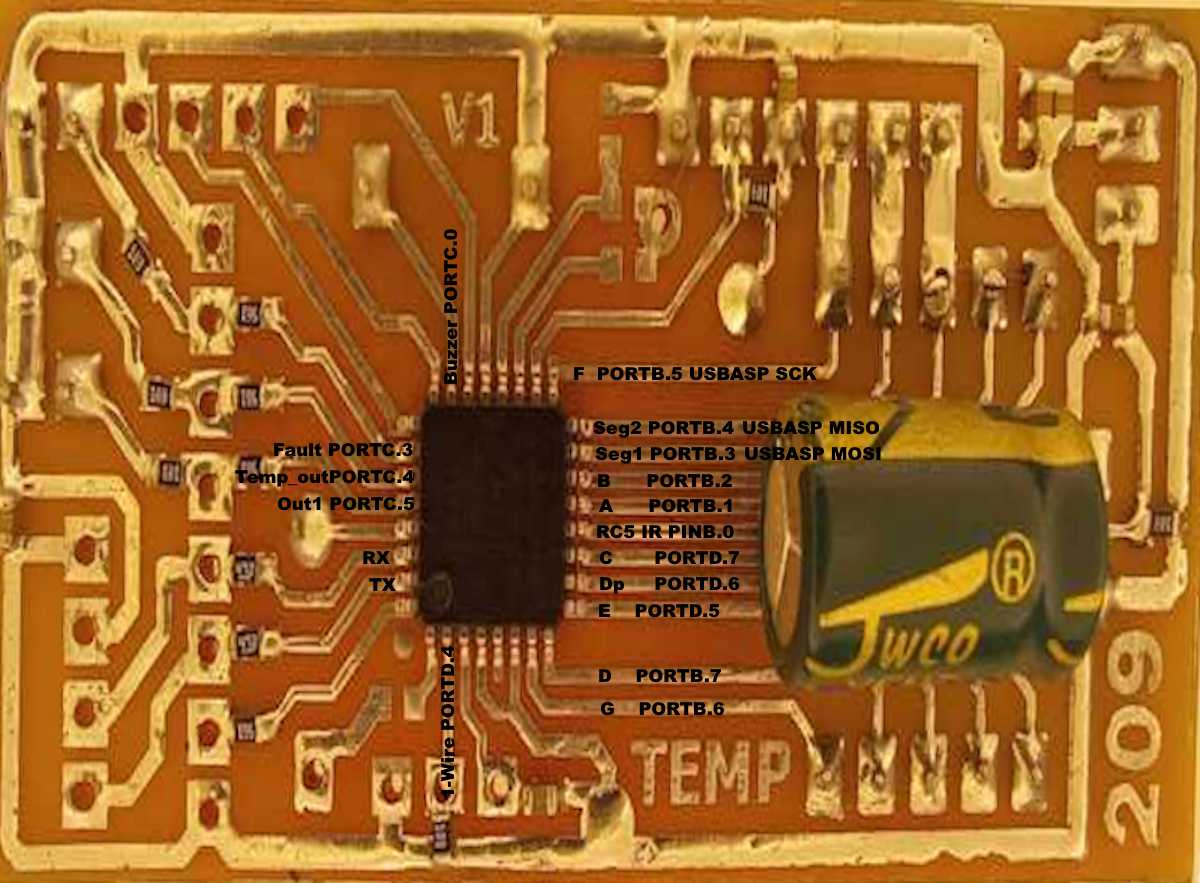
| Function | Pin | Description |
|---|---|---|
| Seg1 | PORTB.3 | Tens digit enable |
| Seg2 | PORTB.4 | Units digit enable |
| A | PORTB.1 | 7-segment A |
| B | PORTB.2 | 7-segment B |
| C | PORTD.7 | 7-segment C |
| D | PORTB.7 | 7-segment D |
| E | PORTD.5 | 7-segment E |
| F | PORTB.5 | 7-segment F |
| G | PORTB.6 | 7-segment G |
| Dp | PORTD.6 | Decimal point |
| Out1 | PORTC.5 | User relay — reserved |
| Temp_out | PORTC.4 | Thermal control relay |
| Buzzer | PORTC.0 | Buzzer |
| Fault | PORTC.3 | Fault input |
| RC5 IR | PINB.0 | IR receiver |
| 1-Wire | PORTD.4 | DS18B20 data |
| TX | PORTD.1 | Serial debug output (9600 baud) |
| RX | PORTD.0 | Serial command input (9600 baud) |
Out1 is a reserved, unused output. Wire it up and use it if needed.
6. 7-Segment Display
Display Type
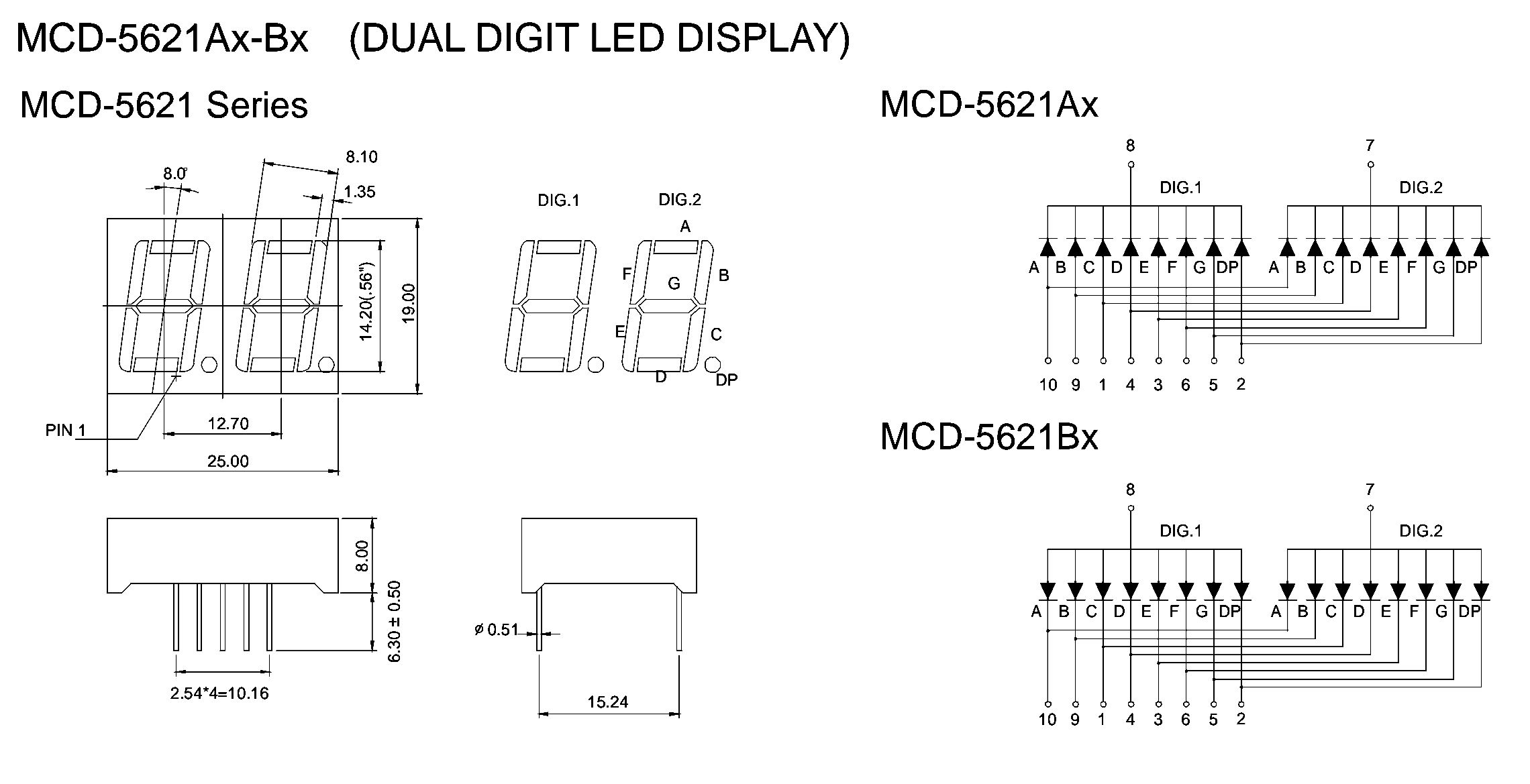
TEMP209 uses a 2-digit 7-segment display as listed in the BOM. But don't worry if you don't have this exact part — any type works:
- Common Cathode
- Common Anode
- Even with pin rearrangement
Why So Flexible?
Common Display Driving Methods
Displays are typically driven by:
- Multiplexers
- Interface ICs (e.g., 74HC595, MAX7219)
Why TEMP209 Connects Directly
Instead of using external driver ICs, TEMP209 connects the display directly to the MCU. This provides:
- 📏 Brevity — simpler circuit
- 💰 Lower cost
- 🎛️ More control
- 💡 Brightness adjustment (PWM-based)
- 🔀 Pin flexibility — works with different display types
- 🔋 Component savings
- 🎓 Educational value — most important of all
Pin Connections
| Segment | MCU Pin | Digit Select | MCU Pin |
|---|---|---|---|
| A | PORTB.1 | Seg1 (tens) | PORTB.3 |
| B | PORTB.2 | Seg2 (units) | PORTB.4 |
| C | PORTD.7 | Multiplexed switching | |
| D | PORTB.7 | ||
| E | PORTD.5 | ||
| F | PORTB.5 | ||
| G | PORTB.6 | ||
| Dp | PORTD.6 | ||
Character Map
| Value | Display | Meaning |
|---|---|---|
| 0–9 | 0–9 | Numeric digits |
| 10 | P | Protection Delay menu |
| 11 | b | Beep menu |
| 12 | d | Delta menu |
| 13 | F | Fault Delay menu |
| 14 | H | Heat/Cool menu |
| 15 | L | Light/Brightness menu |
7. IR Remote Control (RC5)
TEMP209 uses the RC5 protocol with a 3-slot array structure.
Irtxt(1)= Remote Address — used for filtering (default: 3142)Irtxt(2)= Command 1 — primary commandIrtxt(3)= Command 2 — secondary command (optional)
Why Two Commands?
Some RC5 remotes (especially HVAC/AC controls) transmit multiple parameters in a single keypress (e.g., temperature and fan speed). The 3-slot array captures and processes all transmitted data.
Default Command Codes (from firmware)
| Address | Command 1 | Action |
|---|---|---|
| 3142 | 735 | Toggle Power |
| 3142 | 2759 | Toggle Out1 |
| 3142 | 3137 | Report Temperature Log |
| 3142 | 264 | Toggle Menu |
| 3142 | 22 | Setpoint +1°C |
| 3142 | 227 | Setpoint −1°C |
Menu navigation (when Menu = 1):
| Command 1 | Action |
|---|---|
| 2958 | Menu Up |
| 1738 | Menu Down |
| 1825 | Increment parameter |
| 285 | Decrement parameter |
Any RC5 Remote Works
Worried you can't find the example remote? Don't be. Most remotes are RC5, and any remote can be defined. Simply:
- Note the address and command in the Bluetooth terminal
- Replace the values in the code
- Compile and program
You likely have a few spare remotes lying around at home. In the market, especially cheap Bluetooth audio module remotes (like the one used in this project) cost almost nothing.
Pairing Procedure
Connect TX to serial terminal at 9600 baud and press a button. You'll see:
Address=3142
command1=735
command2=22Replace values in the Ir_down subroutine:
If Irtxt(1) = "your_address" Then
    If Irtxt(2) = "your_command1" Then Call YourFunction()
    If Irtxt(3) = "your_command2" Then Call YourSecondaryFunction()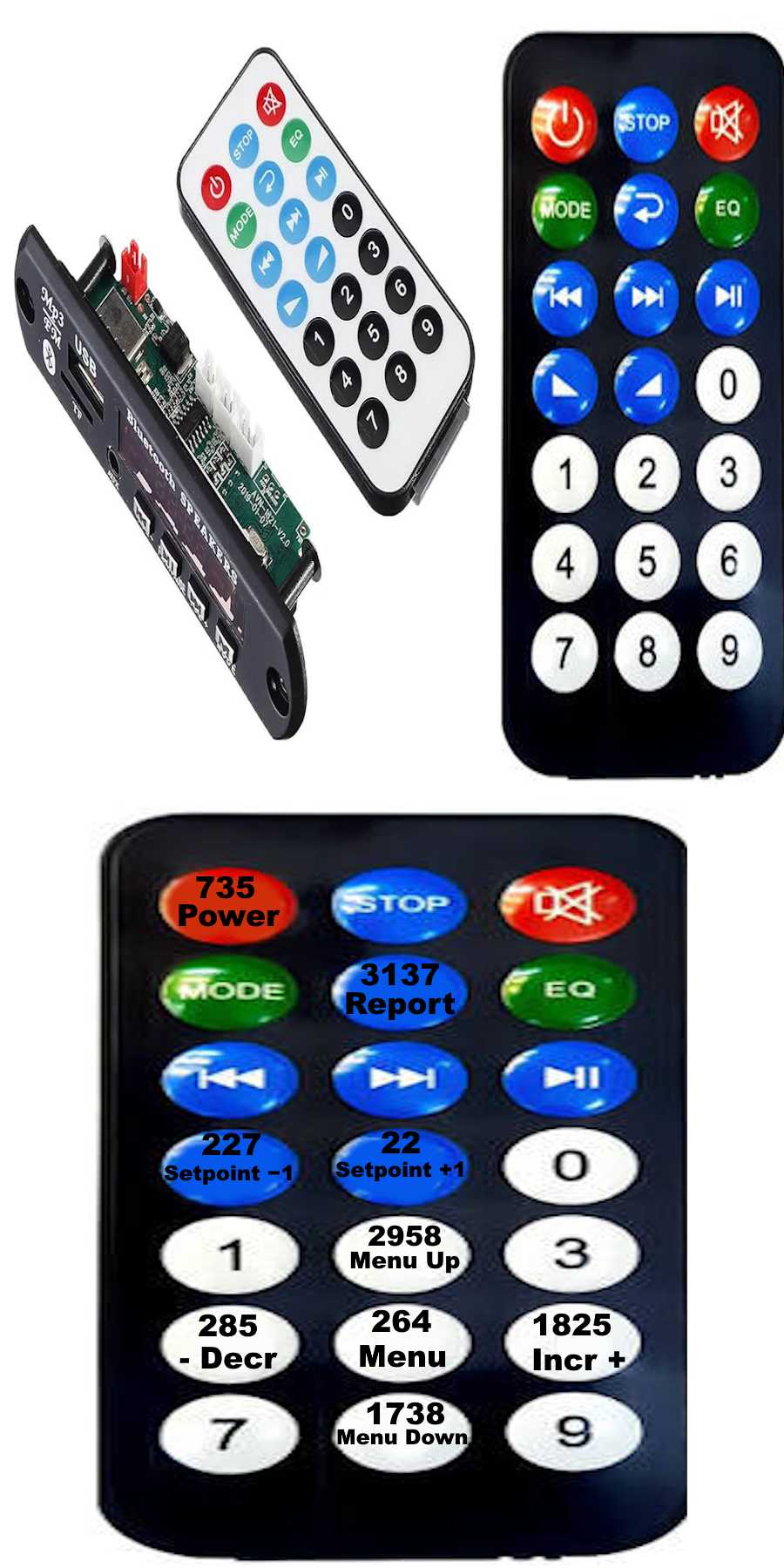
8. Serial Commands
9600 baud, 8N1 — the standard default for common Bluetooth modules.
| Command | Function |
|---|---|
set_temp+ | Increase setpoint by 1°C |
set_temp- | Decrease setpoint by 1°C |
power | Toggle power state |
report | Stream temperature log from EEPROM |
out1 | Toggle Out1 relay |
menu | Toggle menu mode |
up | Menu up |
down | Menu down |
incr | Increment menu parameter |
decr | Decrement menu parameter |
Temp209
relay=1
temp=25
Address=3142
command1=735
command2=22
setpoint=26
Faultreport command):
The log starts with live=N — a reference index that points to the position of the newest sample — followed by raw temperature values (0–255), and ends with end.
live=240
25
26
253
24
27
25
...
end
The value 253 is a position marker (not the end of the log). There can be more than one 253 in the stream — the one closest to live is the valid marker. 255 means an empty/erased EEPROM cell and is shown like any other value.
9. Configuration Menu
Navigate using IR or serial commands. Parameters are stored in EEPROM.
🎮 Access & Navigation
| Action | IR / SoifGo | Serial |
|---|---|---|
| Enter menu | Center button / ◉ | menu |
| Up | ▲ | up |
| Down | ▼ | down |
| Increase value | ▶ | incr |
| Decrease value | ◀ | decr |
| Exit | ◉ again | — |
| Auto-exit | After 8 seconds | — |
⚙️ Parameters
What: Mandatory delay between turning the relay off and back on.
Why: Prevents shock from fast power cycling. Compressors in ACs and fridges (especially low-back-pressure types) may be under pressure and fail to start if switched rapidly — leading to motor stall and damage without protection.
Range: 0 = disabled · 1-9 = minutes
What: Adjusts brightness of the 2-digit display.
Why: Optimize power consumption, or increase brightness in well-lit environments for better visibility.
Range: 0 = lowest · 9 = highest
What: Temperature gap between relay ON and OFF.
Why: Sometimes you need to store a bit of heat or cold, or avoid constant switching from rapid temperature changes. Delta lets the controller run a bit warmer or cooler than the setpoint.
Example: Setpoint = 25, Delta = 2
- Heating: relay ON below 25, OFF above 27
- Cooling: relay ON above 27, OFF below 25
Range: 0-9°C
What: Controls how the controller reacts to the fault input (PORTC.3).
Why: Motors with high inrush current may briefly trigger the fault input on startup. A small delay prevents false trips while still providing protection.
Range:
0= fault monitoring disabled1-9= delay in seconds before reacting to the fault signal
Visual indication: When a fault occurs, the display shows "FF" blinking (eye-catching alert).
Range: 1 = Heating (behaves like a heater) · 0 = Cooling (fridge, AC, ventilation fan)
What: Buzzer volume for key feedback and sensor-failure alarm.
Range: 0 = off · 1-9 = increasing volume
10. Thermal Control Logic
The Heat_cool() subroutine manages automatic temperature regulation:
- Heating Mode (H=1):
Temp_out = 1whenCurrenttemp < Settemp - Cooling Mode (H=0):
Temp_out = 1whenCurrenttemp > Settemp + Deltatemp - Protection Delay (P): Enforces a delay between cycles to protect compressors
- Sensor Error Override: If
Sensorerr = 1, the relay is forced OFF for safety - Fault Override: If fault input is active (after the configured Fault Delay),
Temp_out = 0and display shows blinking "FF"
11. SoifGo Mobile Interface
SoifGo is a mobile app that connects to TEMP209 via Bluetooth, giving you full control from your phone. The UI is customizable — you can modify or extend it as you wish.
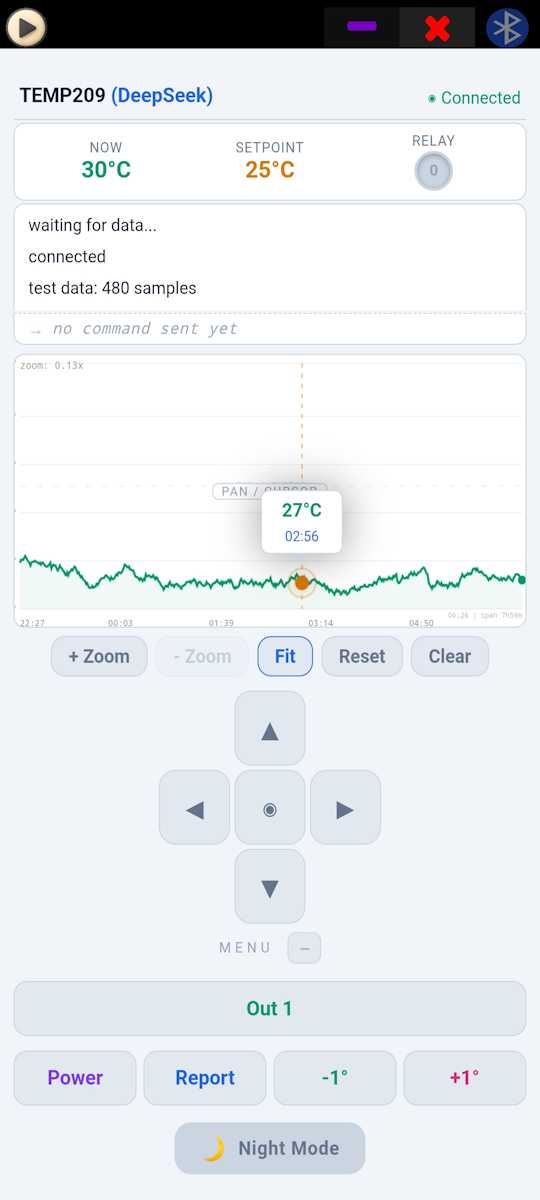
🔌 Bluetooth Connection
Pair your phone with the controller's Bluetooth module and connect. The module communicates at the standard default 9600 baud.
📺 Live Display (Top)
- Live temperature — updated every second
- Setpoint — current target temperature
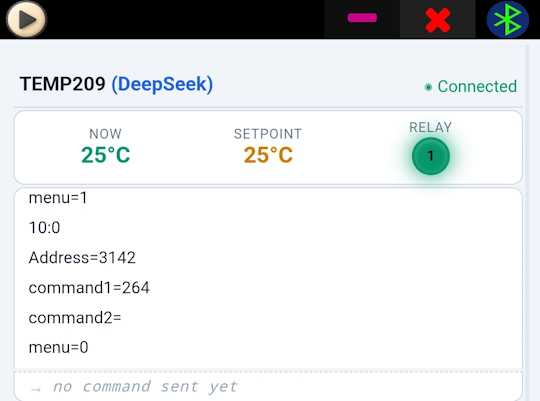
🖥️ Terminal Panel
The most educational feature! When connected, pressing any remote button shows its address and command in the terminal:
Address=3142
command1=735
command2=22
Use this to discover codes for any remote, then replace them in your source, compile, and program.
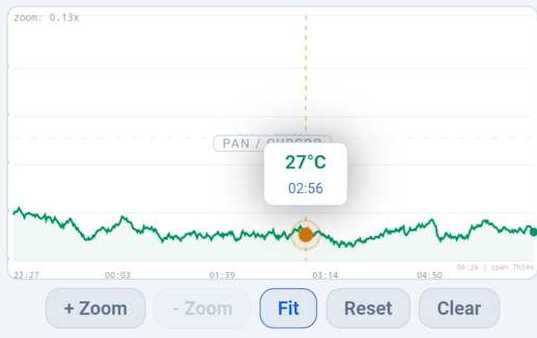
📊 Report Button & Temperature Graph
- Press the Report button
- The command is sent to the controller
- The controller streams the latest log
- Wait ~4 seconds
- The 8-hour temperature graph appears
Graph features:
- 🔍 Zoom in the upper half
- 📍 Pan by dragging
- 📏 Cursor bars show time and temperature (lower half)
🎮 Bottom Buttons (Mimic Remote)
| Button | Function |
|---|---|
| Out1 | Toggle reserved output |
| Power | Toggle device power |
| +1 | Increase setpoint |
| -1 | Decrease setpoint |
| Report | Request temperature log |
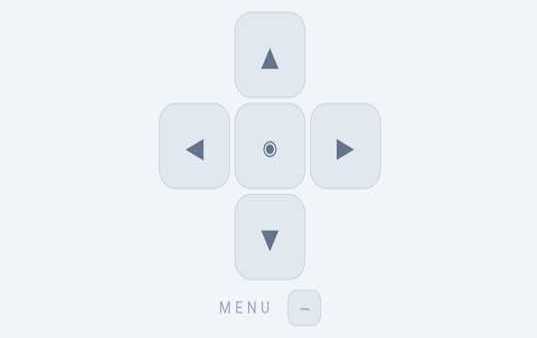
◉ Center D-Pad (5 Buttons)
- ▲ Up
- ▼ Down
- ◀ Left (decrease)
- ▶ Right (increase)
- ◉ Center (enter / exit menu)
12. Fault & Safety
When the fault input on PORTC.3 receives a HIGH signal (2.7V–5V), and after the configured Fault Delay has passed:
- Immediately sets
Temp_out = 0 - Sets
Faultstatus = 1 - Displays blinking "FF" on the 7-segment display
- Sends
Faulton serial
Fault clears when the signal returns LOW or the device is reset.
Fault Delay (F Parameter)
0= fault monitoring disabled (no fault reaction)1-9= delay in seconds before reacting to the fault signal
This is useful for motors with high inrush current that may briefly trigger the fault input on startup, preventing false trips.
Hall Sensor Interface
The Fault input is typically driven by the Hall-sensor current comparator (see Section 14). Any over-current triggers a fault, cutting the relay for protection.
The choice of detection method is yours. You can either:
- Use a UGN503 Hall sensor with a washer and 8-turn wire coil (the method used here), or
- Use a ready-made ACS-series current sensor module (ACS712, ACS724, etc.)
Recommendation: The ACS series is the better choice — compact, high accuracy, and stable output.
- Do NOT rely solely on the F (Fault) protection
- Always add a proper miniature circuit breaker (MCB) to the load side
- Add an inline glass fuse for the MCU power supply
- These are your primary protection; the Fault input is a secondary safety net
13. Hardware
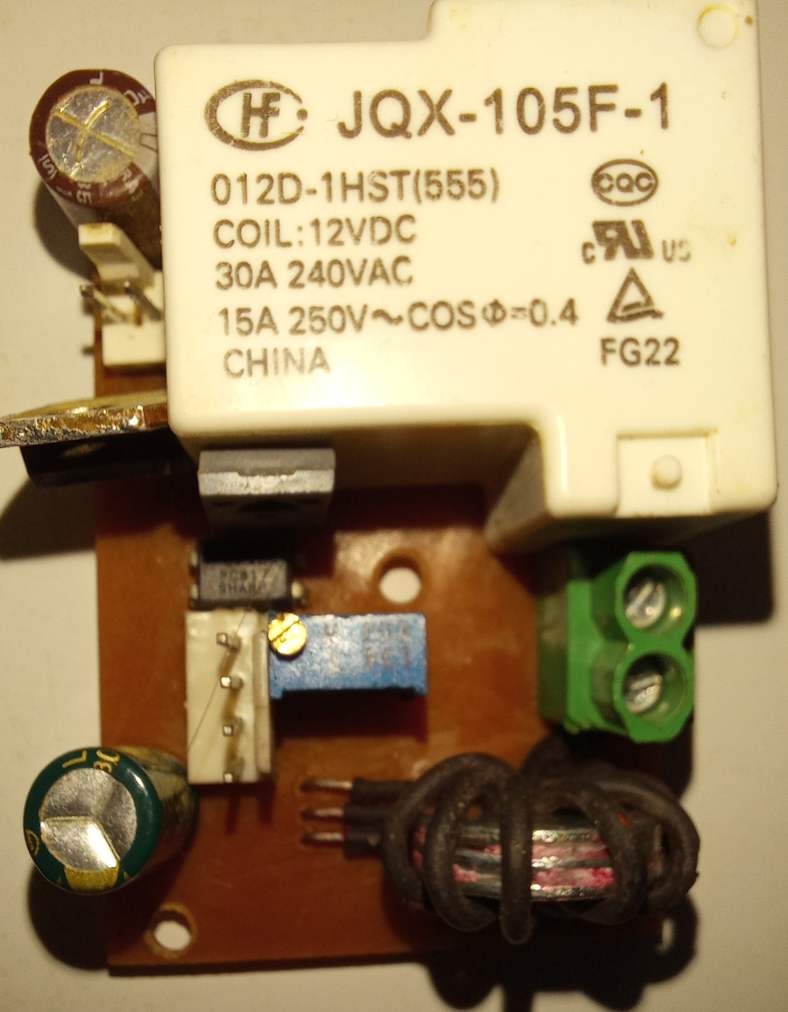
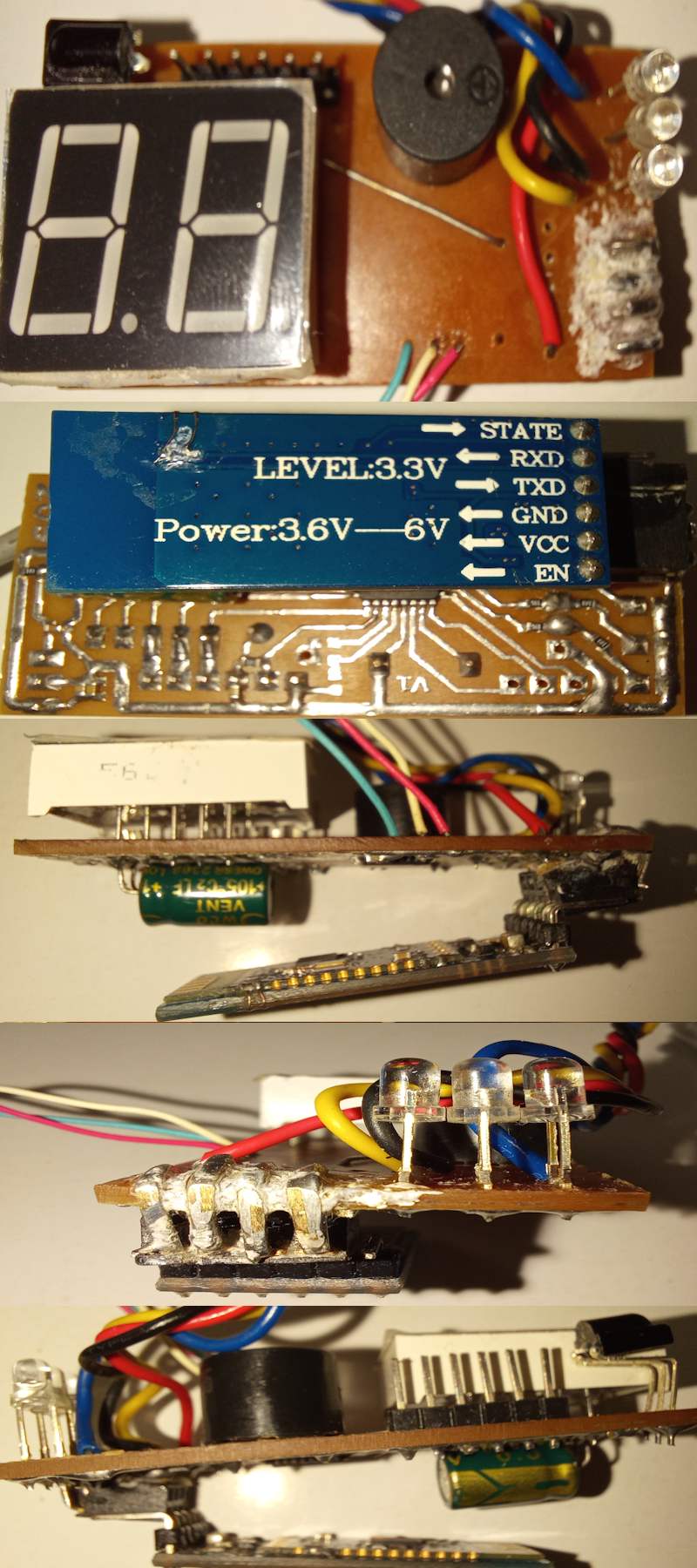
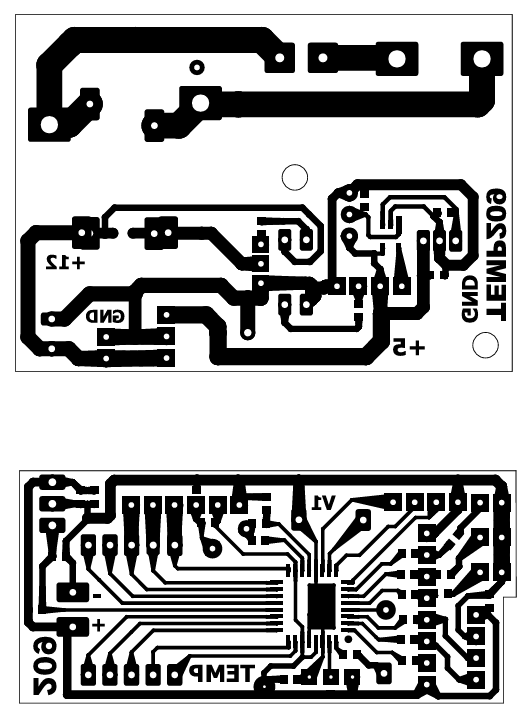
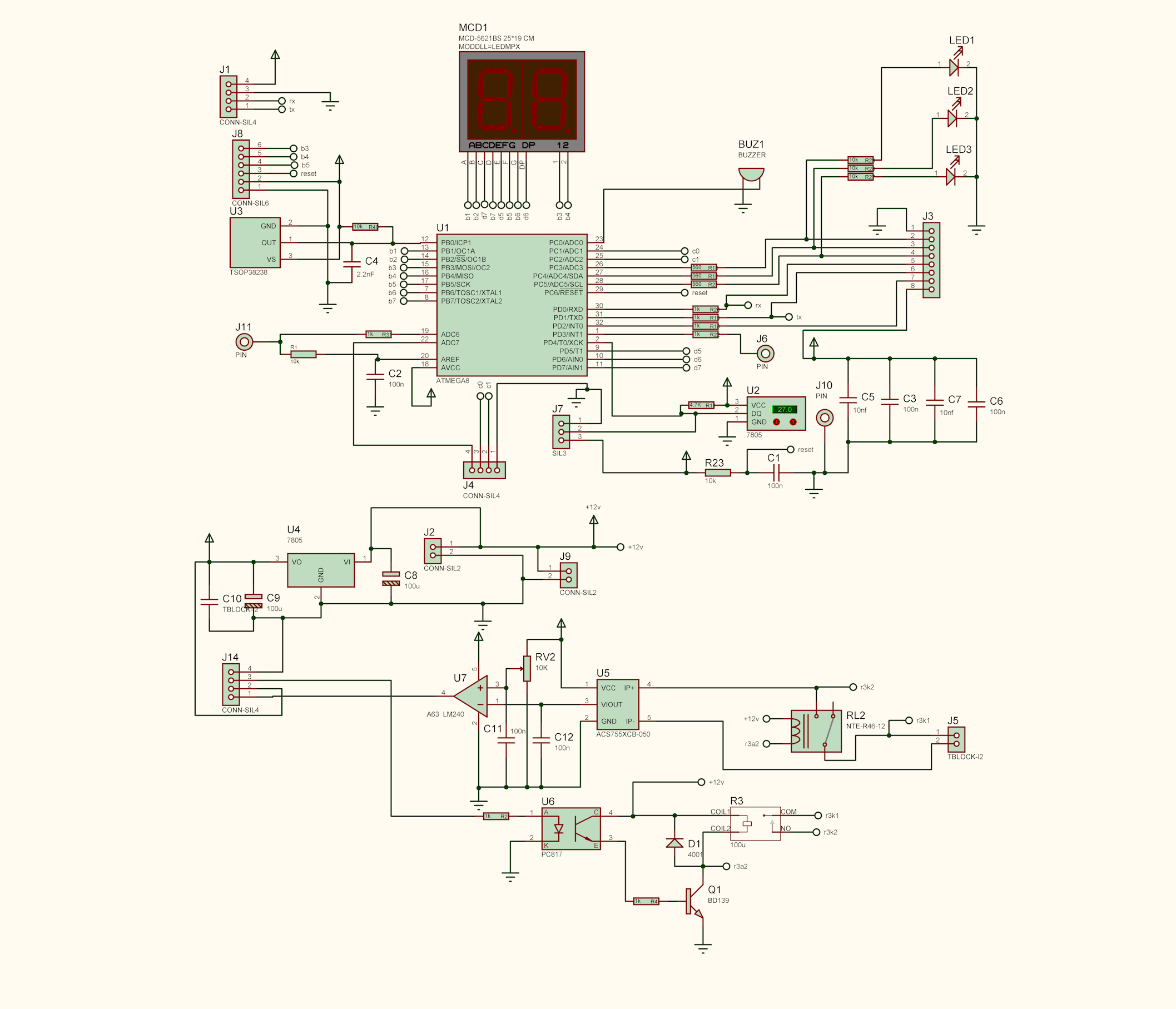
Two-Board Design
TEMP209 is designed as two separate boards:
- Board 1: Display / control / sensor (controller)
- Board 2: Motor / relay / power
Mounting Options
- Integrated: Place both boards side by side in one enclosure
- Split: One near the motor, one in the room or control panel
🛡️ Safety Clearance
On the relay board, sufficient physical spacing is provided between the mains AC section and the low-voltage MCU power section. Be careful when handling the board, and always observe electrical safety practices.
- Load side: Miniature circuit breaker (MCB) matched to your load
- MCU supply: Inline glass fuse (e.g., 500 mA)
- Never operate without fuses
14. Current Sensing with Hall Sensor
The Challenge
Reading AC/DC current to detect over-current and trigger emergency shutdown.
Candidate Methods
| Method | Pros | Cons |
|---|---|---|
| Rectification + capacitor | Simple | Loses useful signal, complex circuit |
| ADC sampling | Accurate | Heavy MCU load, large code |
| Comparator op-amp ⭐ | Cheap, reliable, compact | Needs initial calibration |
🏆 Selected Method: Comparator Op-Amp
Hardware Setup
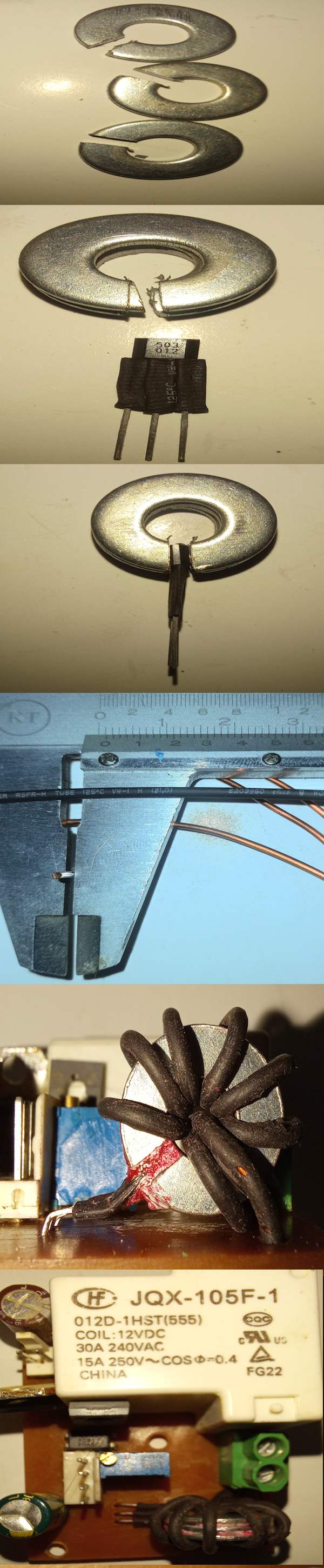
- Hall sensor sandwiched between two metal washers
- 8 turns of wire wound around it
- Hall output with 2.56V offset
How It Works
- AC current: Output oscillates sinusoidally at mains frequency
- DC current: Level shifts above/below the 2.56V offset (depending on direction)
Calculations
- Each 1 A of current → 60 mV at the op-amp output
- 4 A → 4 × 60 mV = 240 mV + 2.56 V = 2.80 V
- 5 A → 5 × 60 mV = 300 mV + 2.56 V = 2.86 V
- Apply the expected maximum normal current (e.g., 4 A).
- At 4 A, the Hall output reaches 2.80 V; the op-amp begins oscillation and the MCU Fault input is triggered.
- The fault LED indicator should be OFF under normal current (e.g., 4 A) — turn the potentiometer until the LED turns off.
- When an over-current occurs (e.g., above 4 A), the fault LED turns ON, the 7-segment display shows blinking "FF", and the relay cuts off.
- The
Faultmessage is also announced on the serial output.
Depending on the op-amp and circuit, fine-tuning may be needed — but one-time calibration is enough.
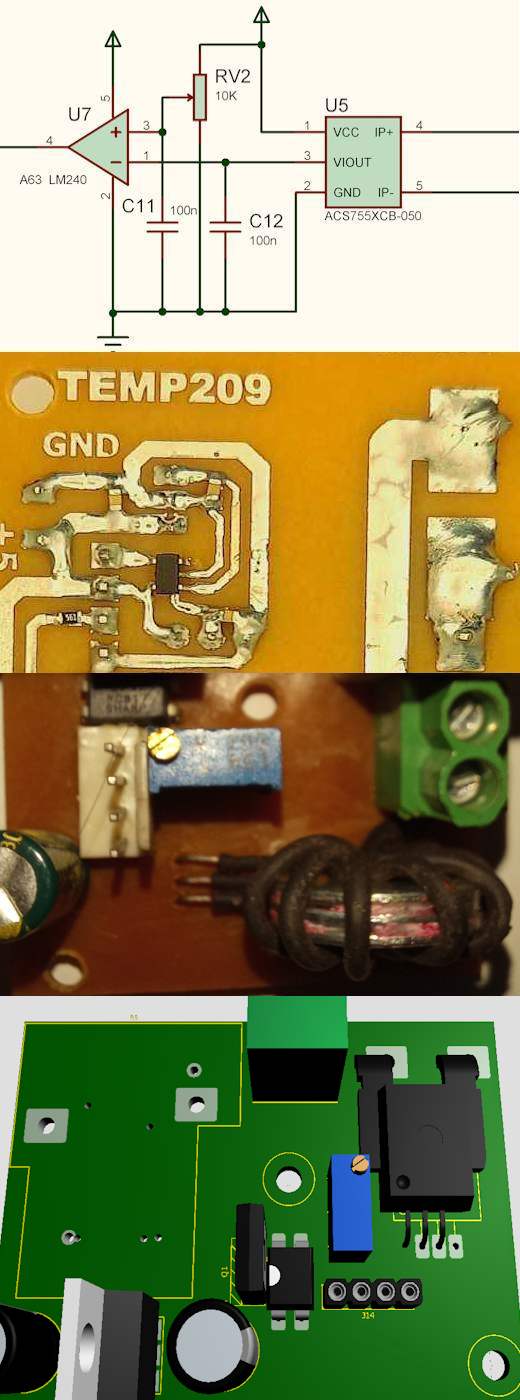
This method (UGN503 + metal washer + wire coil) is educational and may introduce some design error.
Recommended: Use an ACS-series current sensor instead — cleaner and more reliable.
Both methods produce the same type of output (analog voltage proportional to current) — only the scaling values differ.
Main drawback of the UGN503 method: A UGN503 with a core and wire coil is more sensitive to nearby magnetic fields compared to an ACS sensor.
15. 8-Hour Temperature Logger
TEMP209 automatically logs one temperature sample every minute to EEPROM. The buffer works like a CCTV recorder — a 480-sample circular buffer that always holds the last 8 hours. The newest sample is always available, even after power loss.
How It Works
- Every 1 minute: a temperature sample is written to EEPROM
- Capacity: 480 samples = last 8 hours
- Circular buffer: when full, the oldest sample is overwritten
- Position marker: the value
253is written right after the newest sample and travels with it - Persistent: samples survive power loss
- Each minute, the current temperature is written to the next slot, and
253is written right after it. - The previous
253is overwritten by the new temperature sample — so the marker always sits right after the newest temperature. 253is a position marker (not the end of the log). It tells the reader where the newest sample is located in the circular buffer.255= empty / erased EEPROM cell (all bits = 1). It is displayed in the graph like any other value, so blank areas remain visible.
Viewing the Report
| Method | How |
|---|---|
| Serial command | Send report via Bluetooth or cable |
| IR remote | Press the button coded 3137 |
The full report is sent to the SoifGo app, where you can see the temperature graph on your phone. 📊
Report Format
The stream starts with live=N — the reference index of the newest sample — followed by raw temperature values (0–255), and ends with end.
live=240
25
26
253
24
27
25
...
end
253 is a position marker, not the end of the log. If more than one 253 appears in the stream, the reader uses live to pick the correct one (closest to live).
16. Debugging
Monitor serial output at 9600 baud, 8N1 — the standard default for common Bluetooth modules:
Temp209                    - Startup message
relay=1                    - Current relay state
temp=25                    - Current temperature
Address=3142               - Remote address
command1=735               - Primary command
command2=22                - Secondary command
setpoint=26                - Setpoint changed
power=1                    - Power state changed
Fault                      - Fault condition detected
live=240                   - Report start (reference index of newest sample)
25                         - Temperature sample
26                         - Temperature sample
253                        - Position marker
24                         - Temperature sample
end                        - End of report stream
Common Issues
| Symptom | Possible Cause |
|---|---|
| Display shows "--" | Sensor disconnected or faulty |
| Display shows blinking "FF" | Fault input triggered (after Fault Delay) |
| No serial output | Wrong baud rate, TX not connected |
| IR not responding | Wrong remote codes — verify via terminal |
| Relay chatters | Delta too small — increase it |
| False fault trips on motor start | Increase Fault Delay (F parameter) to 1-9 seconds |
17. Building & Programming
🔌 On-Board Programmer Socket
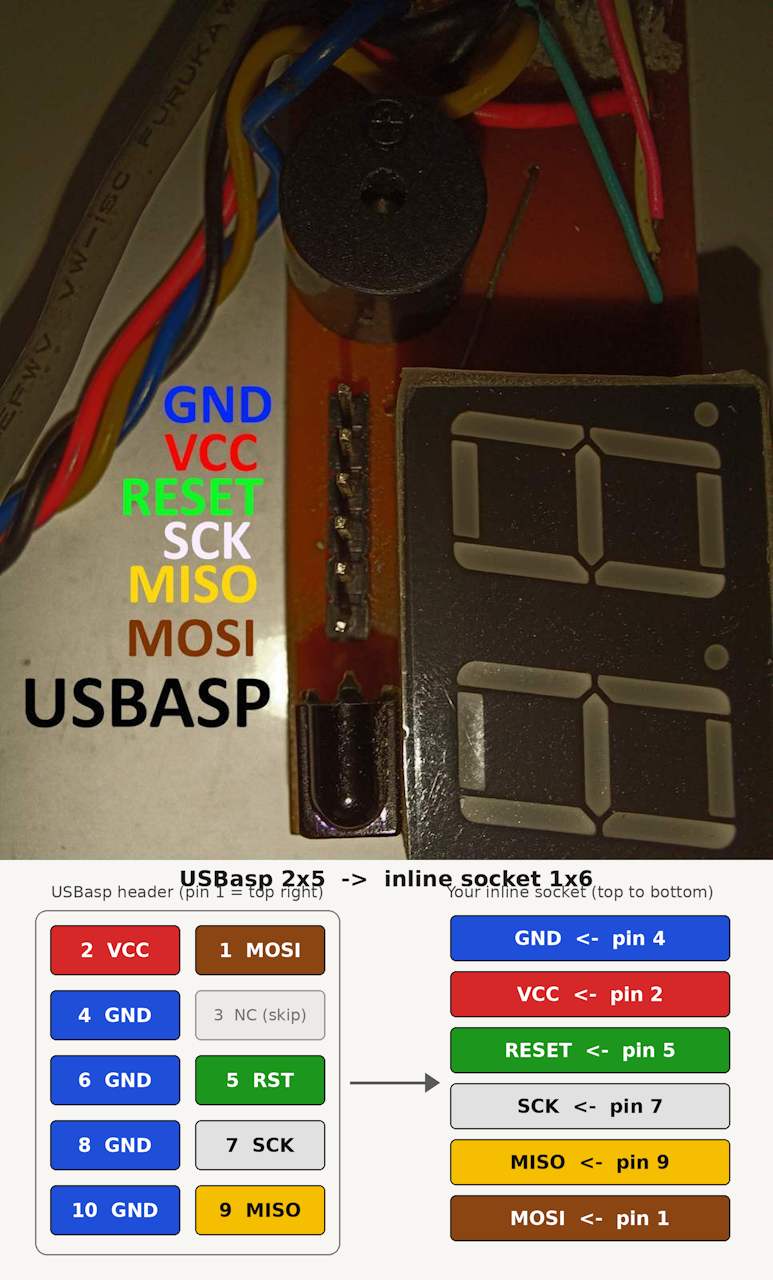
The board includes a programmer socket for easy development and in-circuit programming. You can use any standard AVR programmer, such as USBasp.
💾 Ready-to-Flash HEX Files
🔧 Not Familiar with BASCOM?
Recommended Workflow
- Pick the HEX file that matches your MCU
- Connect USBasp to the programmer socket (use jumper wires if needed)
- Flash the MCU
- Verify via serial terminal at 9600 baud
Advanced users who want to modify the source can open the BASCOM project, adjust remote codes or parameters, recompile, and program the resulting HEX.