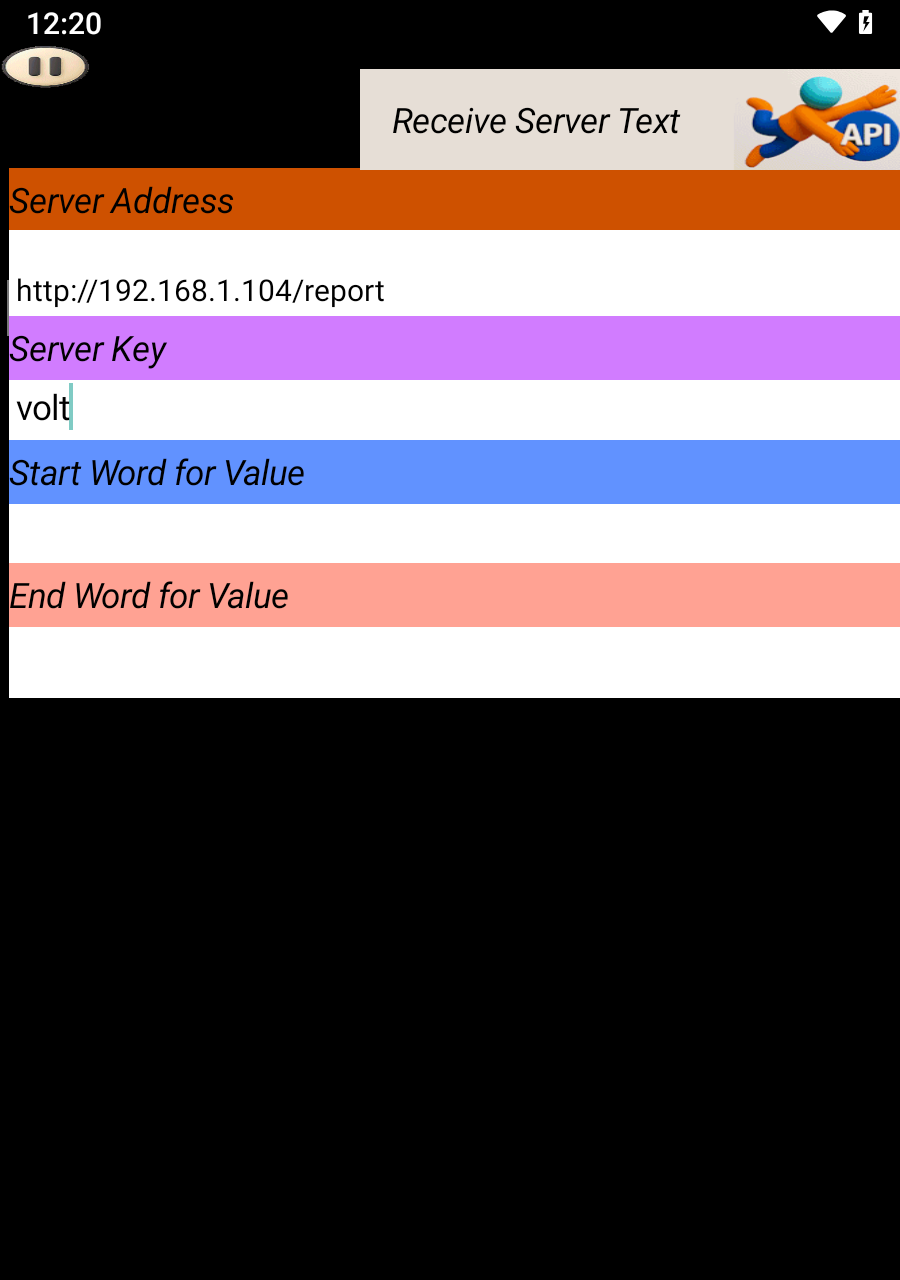
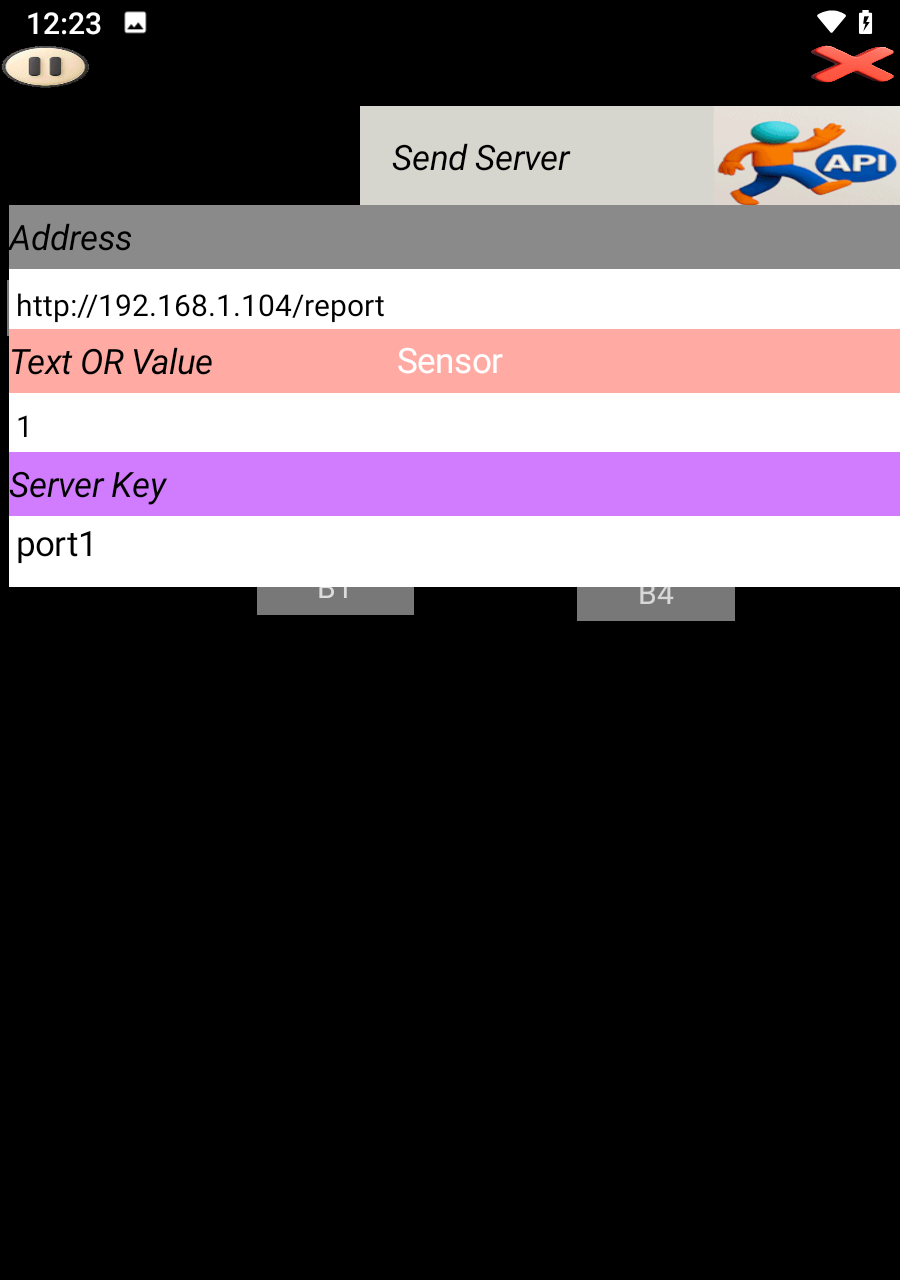
This tutorial helps you set up the ESP8266 Wi-Fi module and connect it to SoifGo.
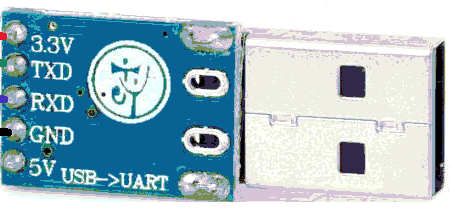
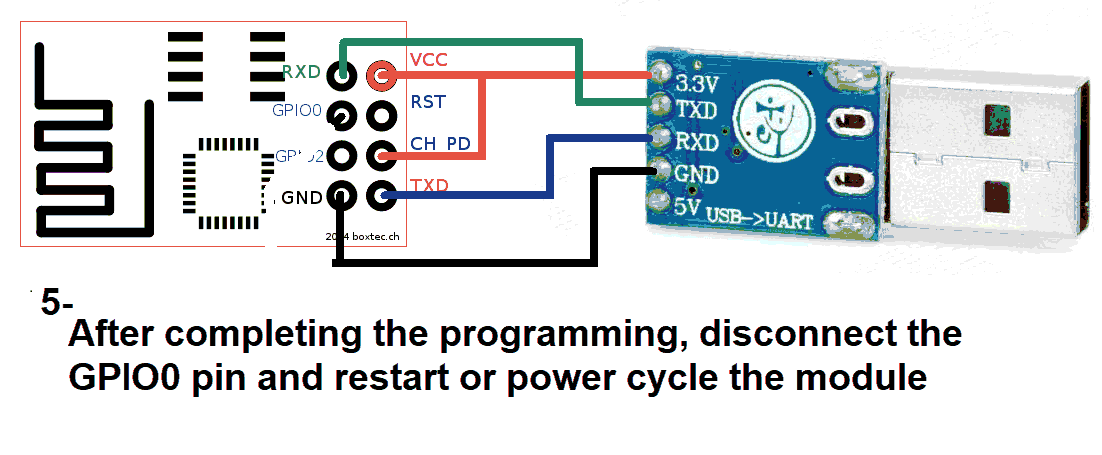
Use a USB to TTL converter. It can be a single USB-to-TTL board or a combination of USB-to-UART and UART-to-TTL.
You’ll need both 5V and 3.3V power sources. Recommended converter:
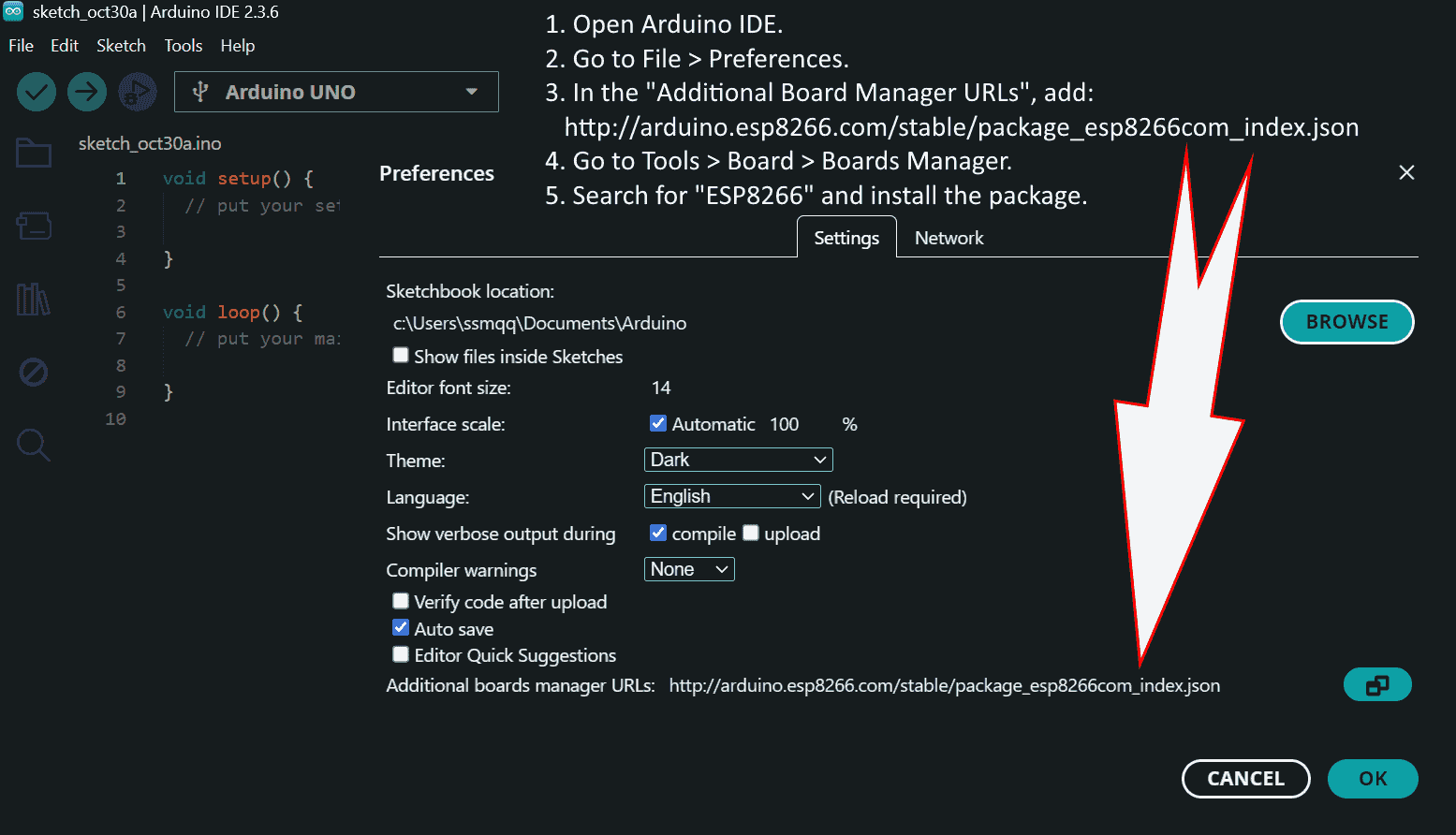
Install the required libraries and check the port and board settings:
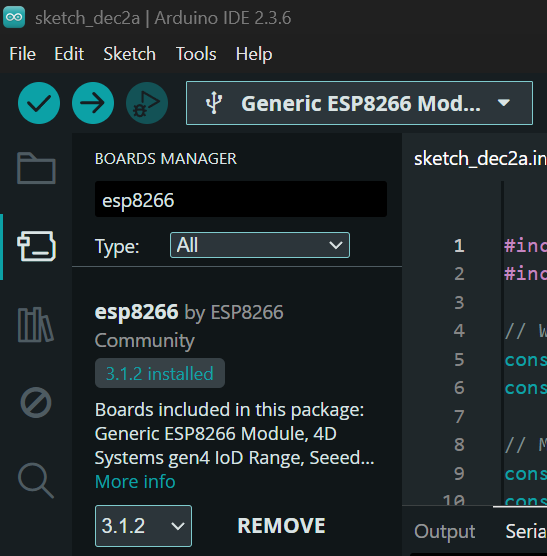
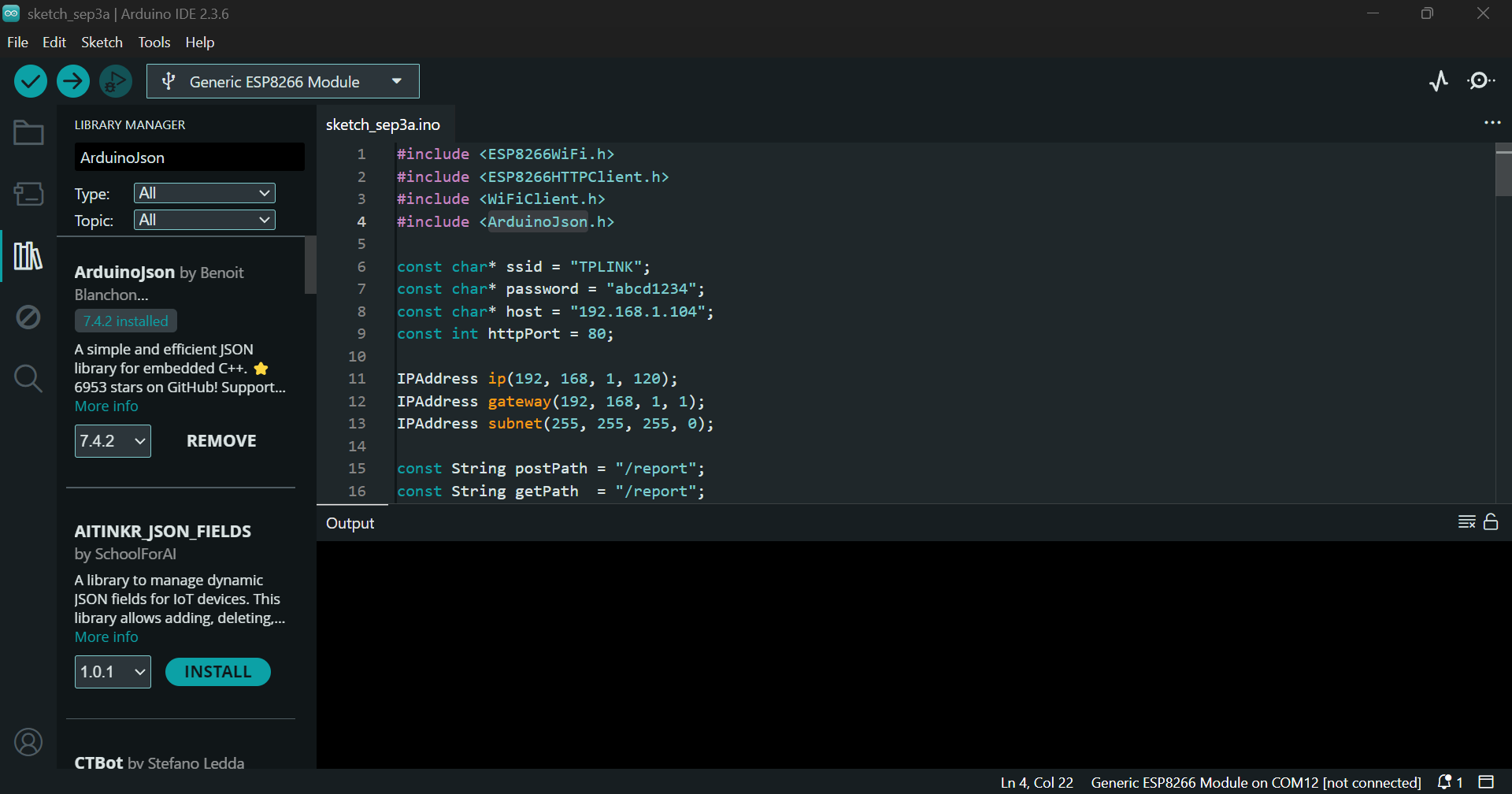
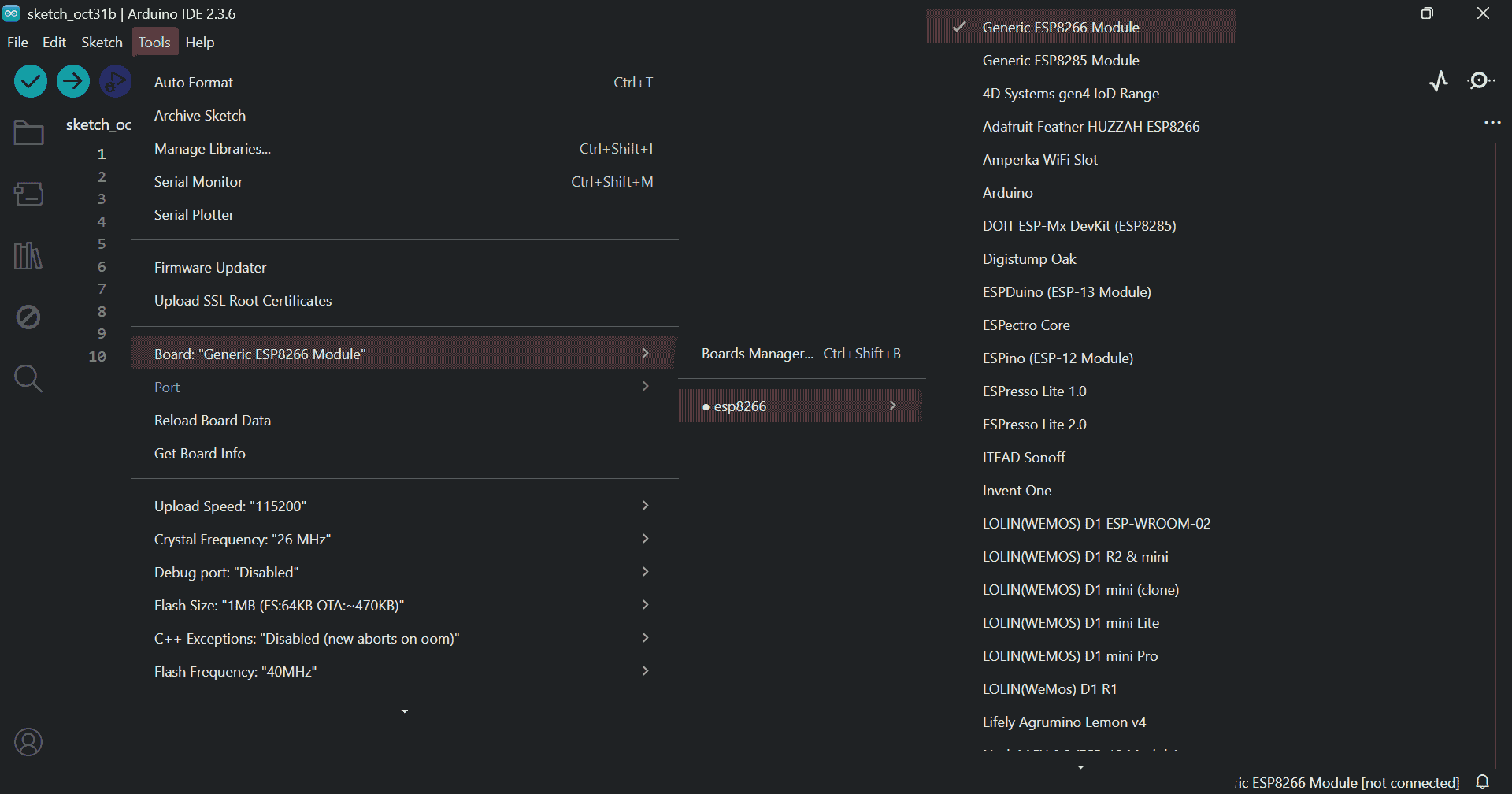
#include
#include
#include
#include

#define EEPROM_SIZE 128

String wifiName;
String wifiPass;
int portLastByte;
String userPath;

IPAddress gateway(192, 168, 1, 1);
IPAddress subnet(255, 255, 255, 0);
IPAddress ip;

ESP8266WebServer server(80);
StaticJsonDocument<2048> dataStore;

unsigned long lastCheckTime = 0;

void saveStringToEEPROM(int start, const String& str) {
  for (int i = 0; i < str.length(); i++) {
    EEPROM.write(start + i, str[i]);
    yield();
  }
  EEPROM.write(start + str.length(), '\0');
}

String readStringFromEEPROM(int start) {
  char data[32];
  int i = 0;
  while (i < 31) {
    char c = EEPROM.read(start + i);
    if (c == '\0') break;
    data[i++] = c;
    yield();
  }
  data[i] = '\0';
  return String(data);
}

void saveSettings() {
  saveStringToEEPROM(0, wifiName);
  saveStringToEEPROM(32, wifiPass);
  EEPROM.write(64, portLastByte);
  saveStringToEEPROM(65, userPath);
  EEPROM.write(127, 1);
  EEPROM.commit();
}

void loadSettings() {
  bool isInitialized = EEPROM.read(127) == 1;

  if (isInitialized) {
    wifiName = readStringFromEEPROM(0);
    wifiPass = readStringFromEEPROM(32);
    portLastByte = EEPROM.read(64);
    userPath = readStringFromEEPROM(65);
  } else {
    wifiName = "TPLINK";
    wifiPass = "abcd1234";
    portLastByte = 104;
    userPath = "report";
    saveSettings();
  }

  if (wifiName.length() == 0) wifiName = "TPLINK";
  if (wifiPass.length() == 0) wifiPass = "abcd1234";
  if (portLastByte == 0 || portLastByte > 254) portLastByte = 104;
  if (userPath.length() == 0) userPath = "report";
}

void setup() {
  Serial.begin(115200);
  EEPROM.begin(EEPROM_SIZE);
  loadSettings();

  ip = IPAddress(192, 168, 1, portLastByte);
  WiFi.config(ip, gateway, subnet);
  WiFi.begin(wifiName.c_str(), wifiPass.c_str());

  Serial.println("Connecting to WiFi...");
  unsigned long startAttemptTime = millis();
  while (WiFi.status() != WL_CONNECTED && millis() - startAttemptTime < 10000) {
    delay(500);
    Serial.print(".");
    yield();
  }

  if (WiFi.status() == WL_CONNECTED) {
    Serial.println("\nConnected to WiFi");
    Serial.print("IP Address: ");
    Serial.println(WiFi.localIP());
    Serial.print("MAC Address: ");
    Serial.println(WiFi.macAddress());
  } else {
    Serial.println("\nFailed to connect to WiFi.");
  }

  server.on("/", HTTP_GET, []() {
    server.send(200, "application/json", "{\"message\":\"ESP8266 dynamic key server active\"}");
  });

  server.on("/keys", HTTP_GET, []() {
    JsonArray keys = dataStore.createNestedArray("_keys");
    for (JsonPair kv : dataStore.as()) {
      if (String(kv.key().c_str()) != "_keys") {
        keys.add(kv.key());
      }
    }
    String response;
    serializeJson(keys, response);
    server.send(200, "application/json", response);
  });

  server.on("/" + userPath, HTTP_GET, []() {
    if (dataStore.containsKey("/" + userPath)) {
      String response;
      serializeJson(dataStore["/" + userPath], response);
      server.send(200, "application/json", response);
    } else {
      server.send(404, "application/json", "{\"status\":\"error\", \"message\":\"No data yet\"}");
    }
  });

  server.on("/" + userPath, HTTP_POST, []() {
    if (server.hasArg("plain")) {
      String body = server.arg("plain");
      StaticJsonDocument<512> incoming;
      DeserializationError error = deserializeJson(incoming, body);
      if (error) {
        server.send(400, "application/json", "{\"status\":\"error\", \"message\":\"Invalid JSON\"}");
        return;
      }

      JsonObject stored;
      if (dataStore["/" + userPath].is()) {
        stored = dataStore["/" + userPath].as();
      } else {
        stored = dataStore.createNestedObject("/" + userPath);
      }

      for (JsonPair kv : incoming.as()) {
        stored[kv.key()] = kv.value();
        if (WiFi.status() == WL_CONNECTED) {
          Serial.println(" " + String(kv.key().c_str()) + ":" + String(kv.value().as()));
        }
        yield();
      }

      String response;
      serializeJson(stored, response);
      server.send(200, "application/json", response);
    } else {
      server.send(400, "application/json", "{\"status\":\"error\", \"message\":\"No data received\"}");
    }
  });

  server.begin();
}

void loop() {
  server.handleClient();
  checkWiFiConnection();
  handleSerialFromMicro();
  yield();
}

void checkWiFiConnection() {
  unsigned long currentTime = millis();
  if (currentTime - lastCheckTime >= 10000) {
    lastCheckTime = currentTime;
    if (WiFi.status() != WL_CONNECTED) {
      WiFi.begin(wifiName.c_str(), wifiPass.c_str());
    }
  }
}

void handleSerialFromMicro() {
  static String serialBuffer = "";
  while (Serial.available()) {
    char c = Serial.read();
    serialBuffer += c;
    yield();

    if (c == '\n') {
      serialBuffer.trim();

      if (serialBuffer.startsWith("#") && serialBuffer.endsWith("*")) {
        String input = serialBuffer.substring(1, serialBuffer.length() - 1);

        if (input.startsWith("wifi=")) {
          wifiName = input.substring(5);
          saveSettings();
          Serial.println("WiFi name changed to: " + wifiName);
        } else if (input.startsWith("pass=")) {
          wifiPass = input.substring(5);
          saveSettings();
          Serial.println("WiFi password changed to: " + wifiPass);
        } else if (input.startsWith("port=")) {
          portLastByte = input.substring(5).toInt();
          saveSettings();
          Serial.println("IP updated: http://192.168.1." + String(portLastByte) + "/" + userPath);
        } else if (input.startsWith("user=")) {
          userPath = input.substring(5);
          saveSettings();
          Serial.println("User path updated: http://192.168.1." + String(portLastByte) + "/" + userPath);
        } else if (input == "reset") {
          wifiName = "TPLINK";
          wifiPass = "abcd1234";
          portLastByte = 104;
          userPath = "report";
          saveSettings();
          Serial.println("Settings reset to default.");
        } else if (input.startsWith("GET:")) {
          String key = input.substring(4);
          if (dataStore.containsKey("/" + userPath)) {
            JsonObject obj = dataStore["/" + userPath];
            if (obj.containsKey(key)) {
              String value = obj[key].as();
              Serial.println(key + ":" + value);
            } else {
              Serial.println(key + ":?");
            }
          } else {
            Serial.println(key + ":?");
          }
        } else {
          int sepIndex = input.indexOf(":");
          if (sepIndex > 0) {
            String key = input.substring(0, sepIndex);
            String value = input.substring(sepIndex + 1);

            JsonObject obj;
            if (dataStore["/" + userPath].is()) {
              obj = dataStore["/" + userPath].as();
            } else {
              obj = dataStore.createNestedObject("/" + userPath);
            }

            obj[key] = value;
          }
        }
      }

      serialBuffer = "";
    }

    if (serialBuffer.length() > 256) {
      serialBuffer = "";
    }
  }
}
Download the program file:
📦 Download esp8266.zipPaste the code into Arduino IDE. You can configure Wi-Fi settings before upload:
wifiName = "TPLINK";
wifiPass = "abcd1234";
portLastByte = 104;
userPath = "report";
Or send commands via serial after upload:
#wifi=TPLINK*
#pass=abcd1234*
#port=104*
#user=report*
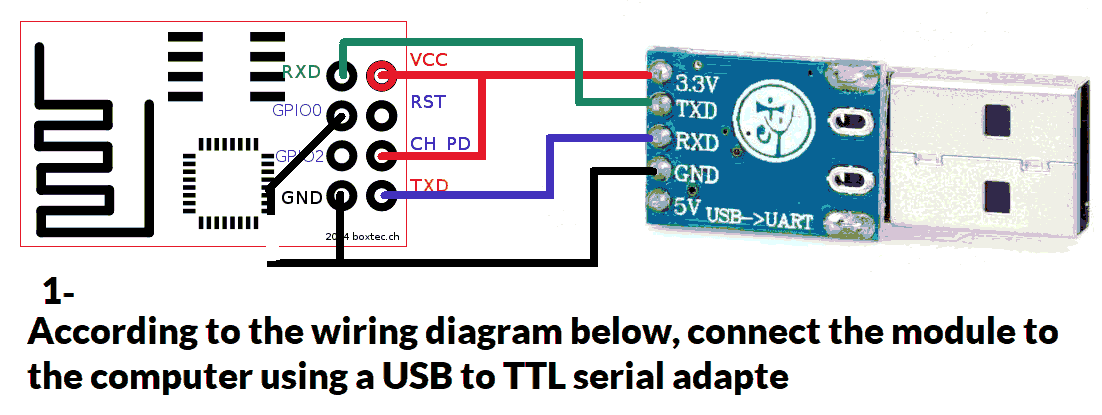
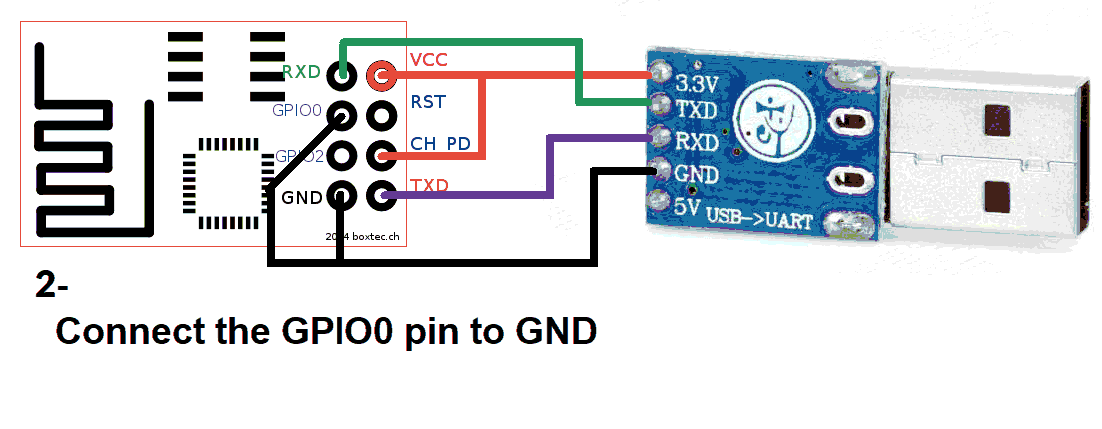
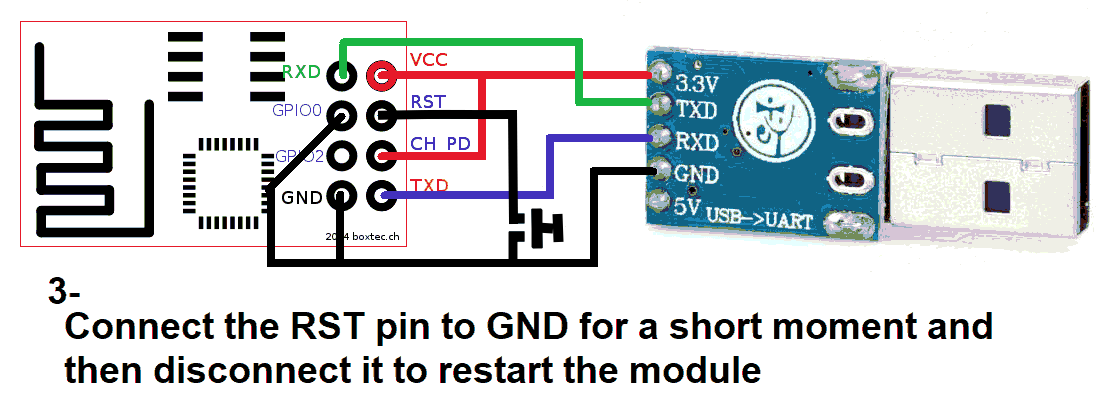
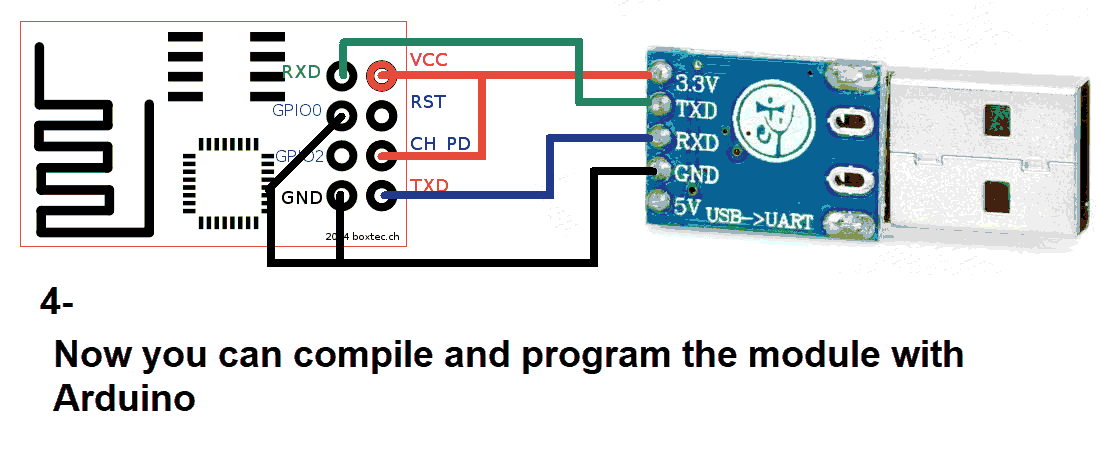
Click Verify and then Upload in Arduino:
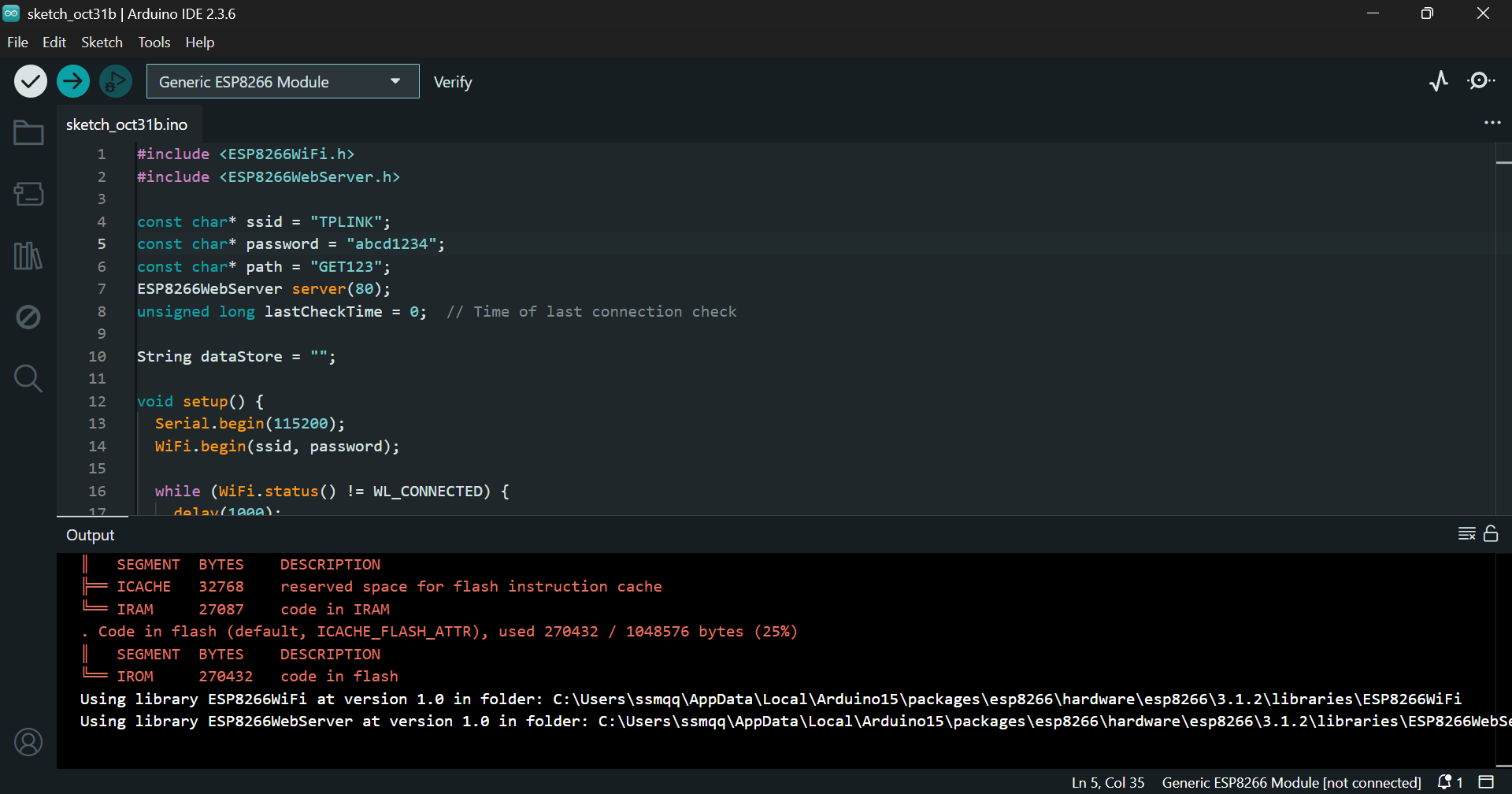
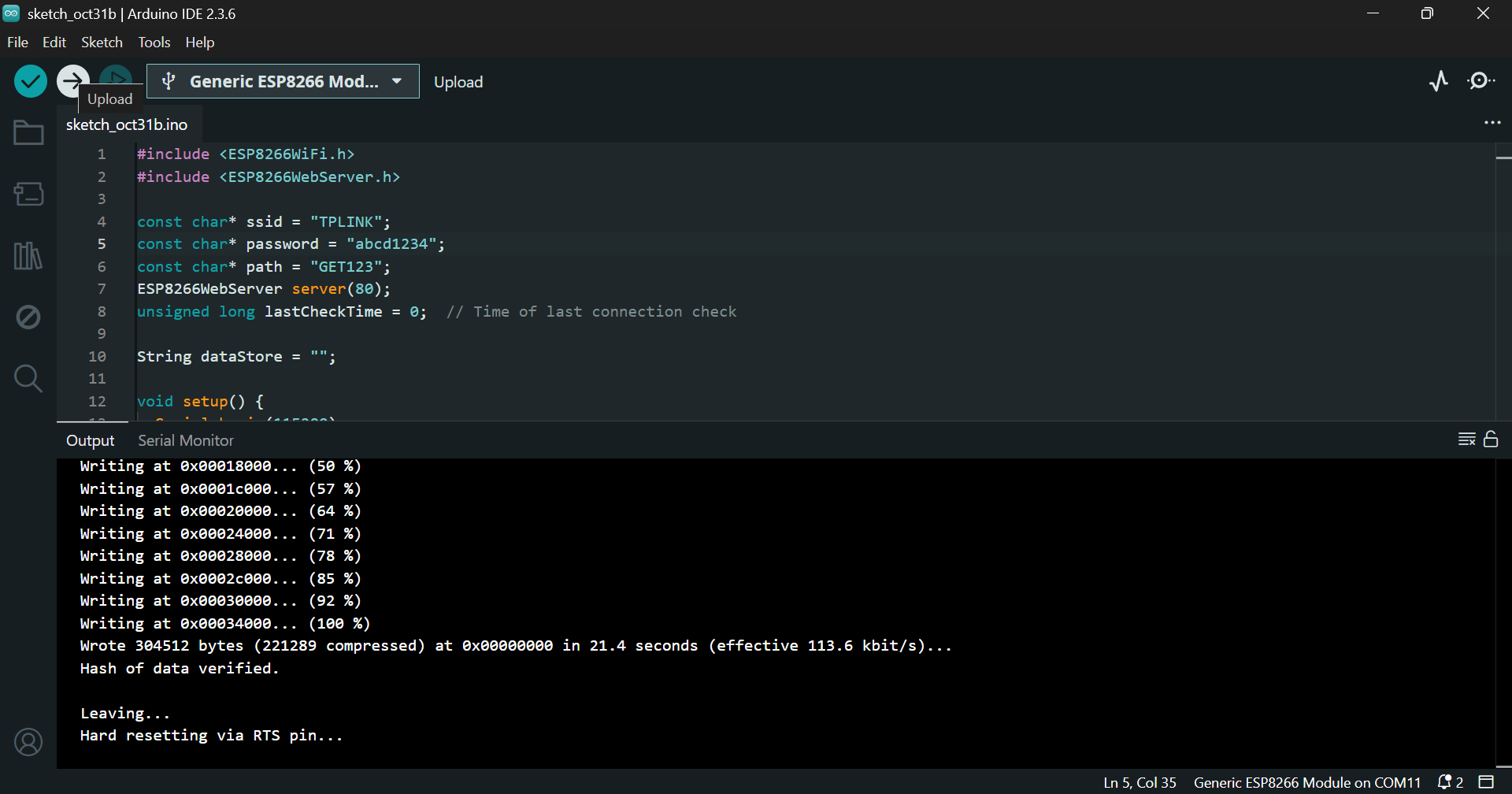
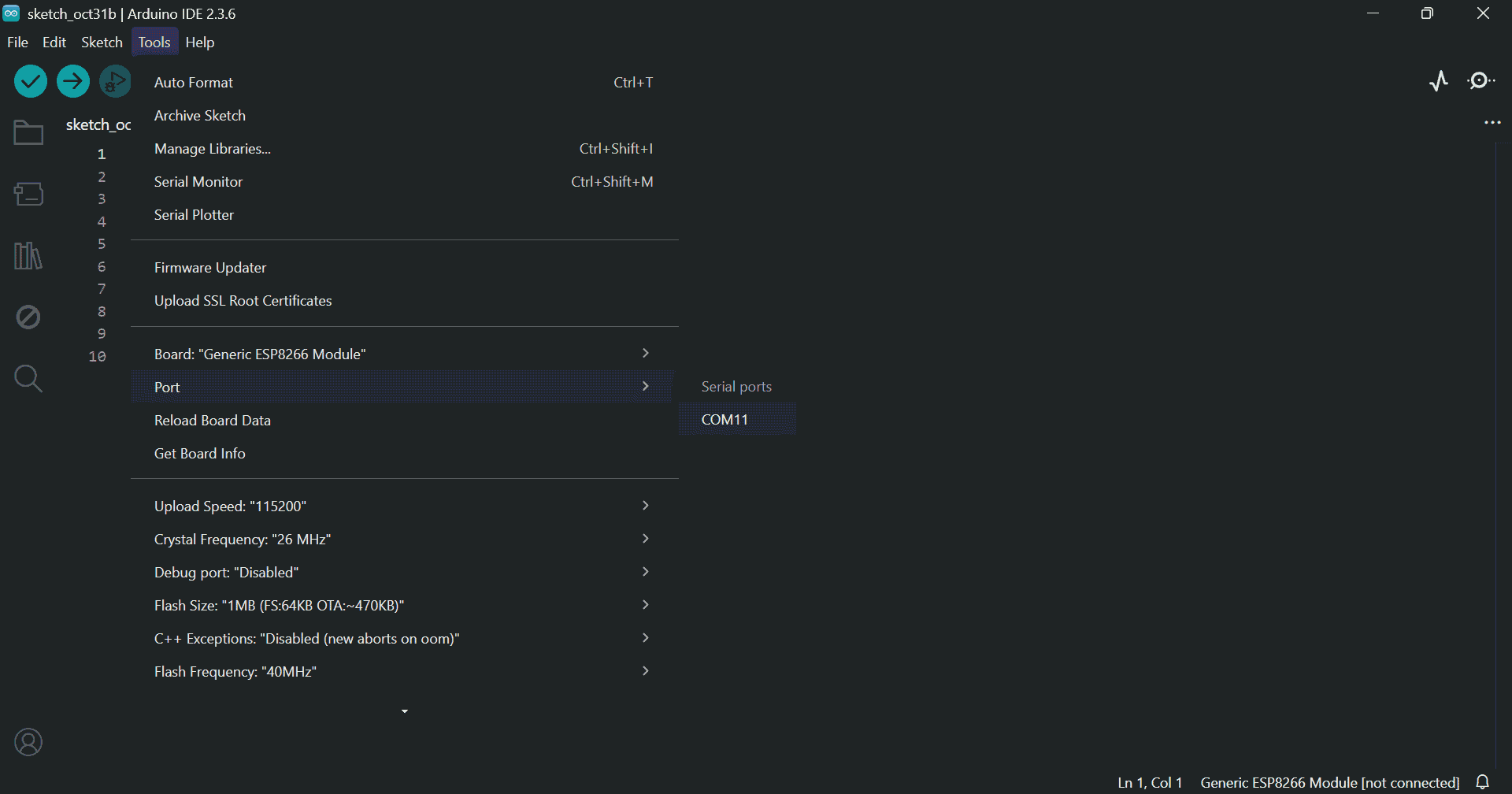
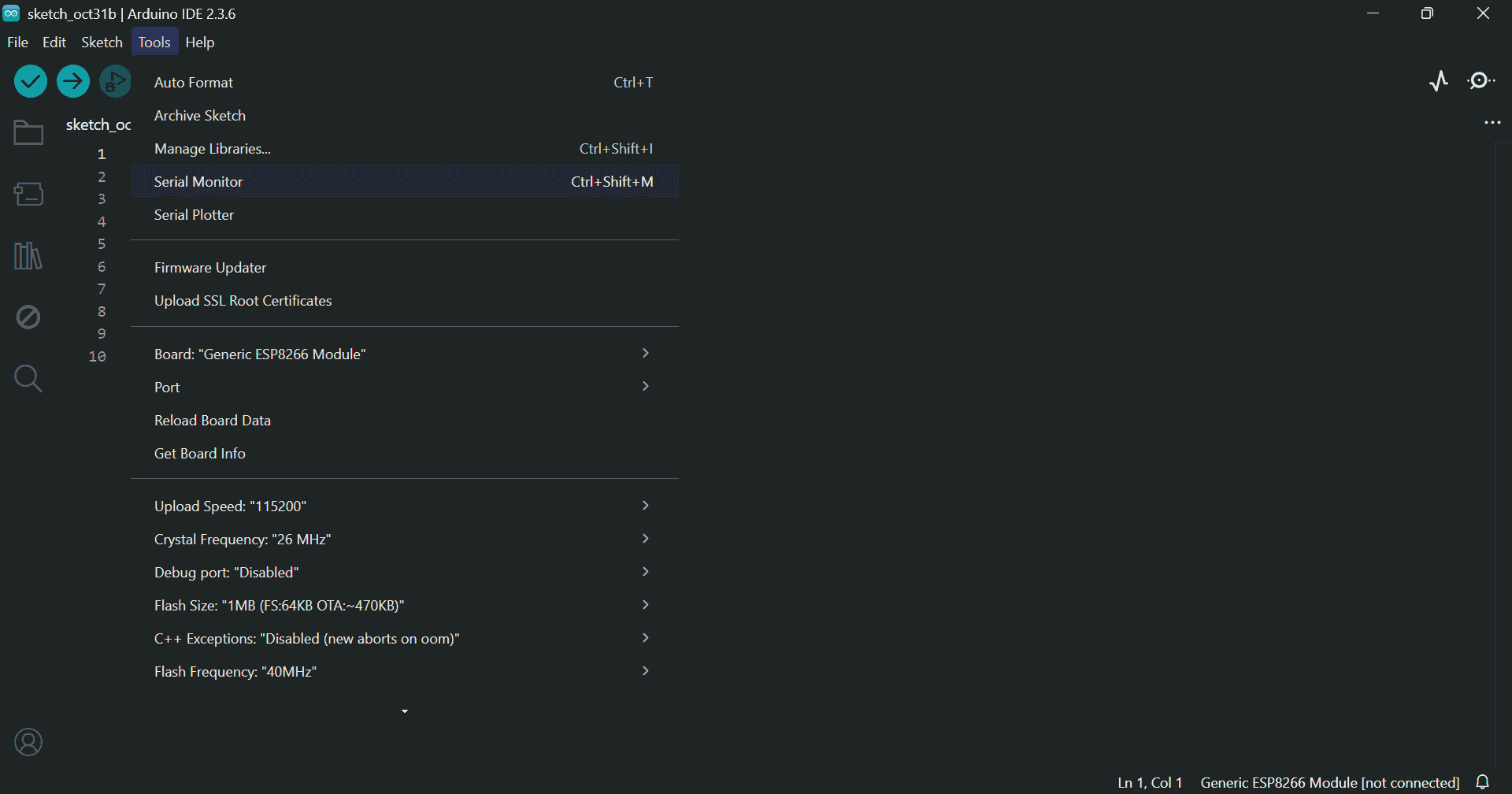
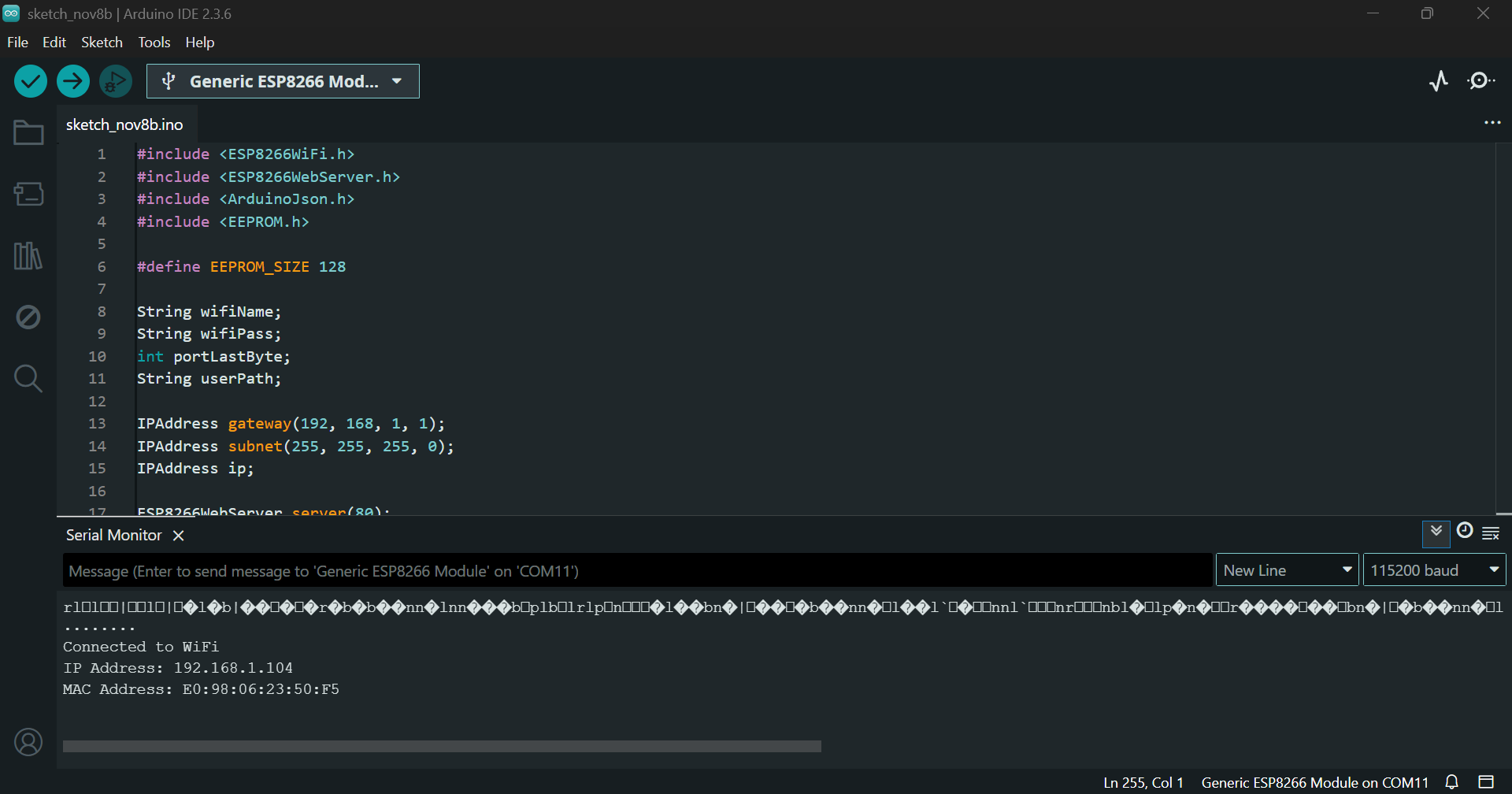
Restart the module. You should see output like:
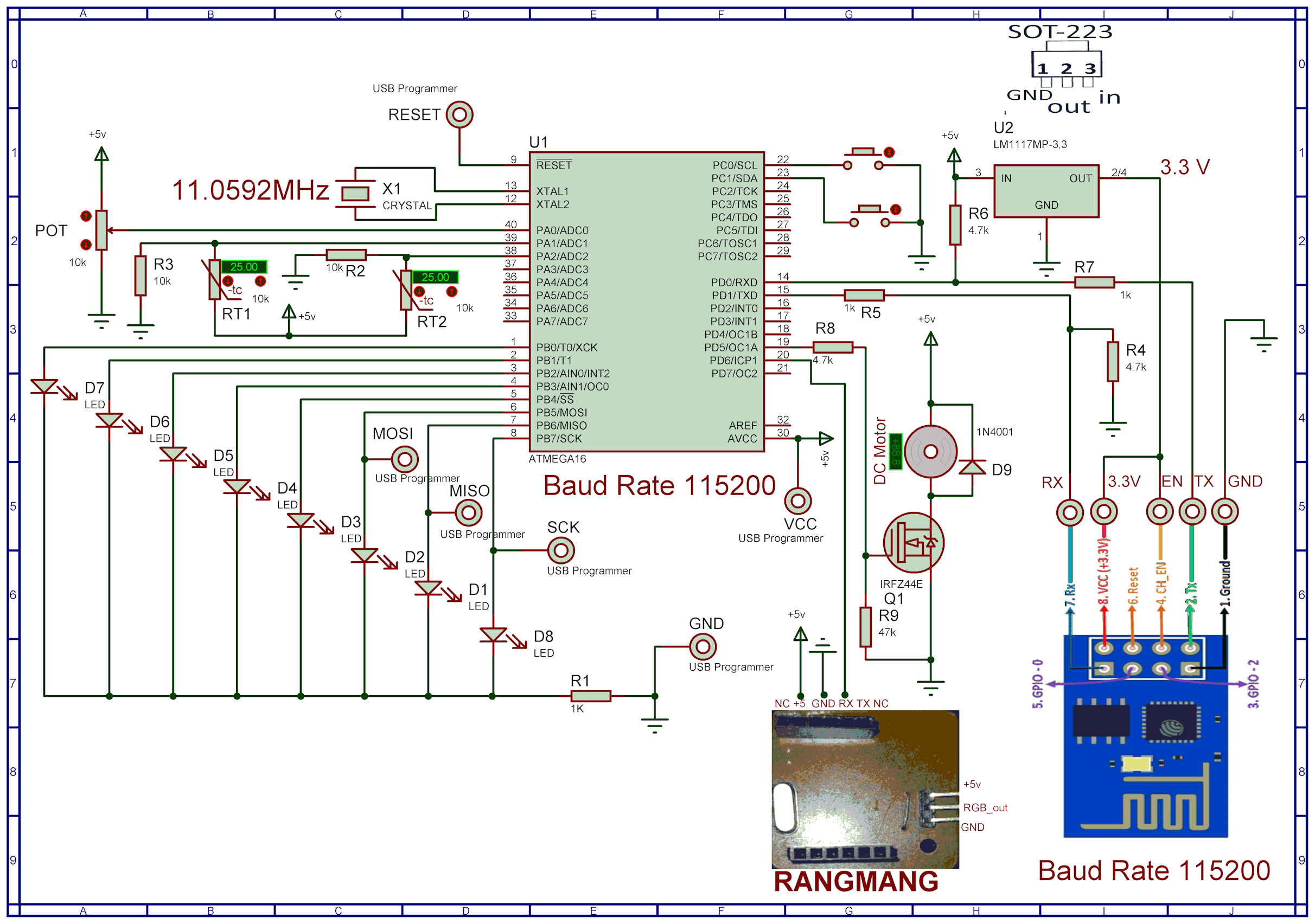
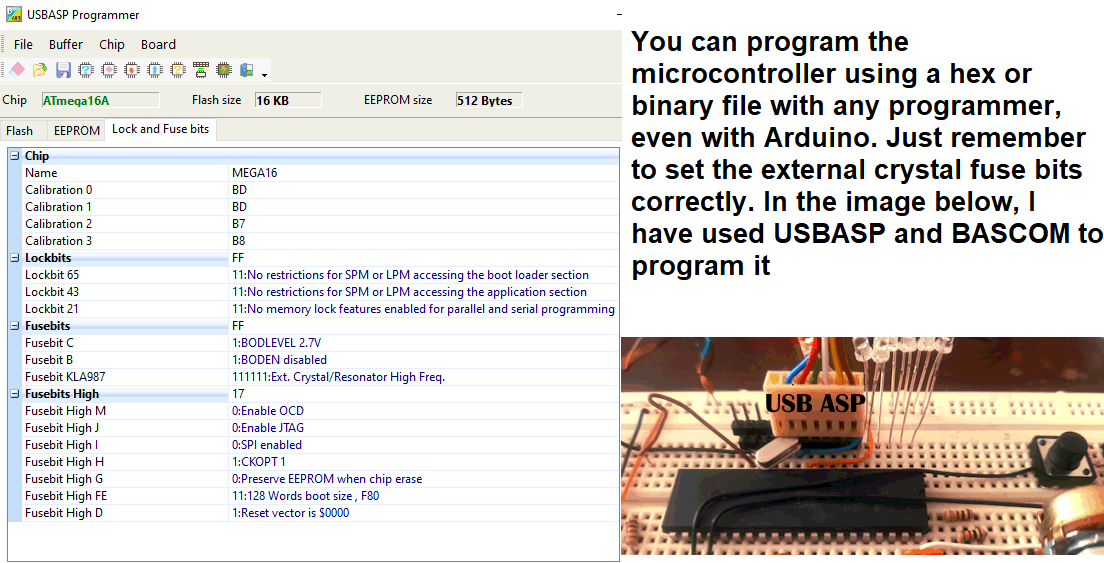
Program your ATmega16 using a compatible programmer:
$regfile = "m16adef.dat"
$crystal = 11059200

Config Adc = Single , Prescaler = Auto , Reference = Avcc
Config Timer1 = Pwm , Pwm = 10 , Compare_a_pwm = Clear_up , Compare_b_pwm = Clear_up , Prescale = 1
Declare Sub Red

CONFIG PORTB=OUTPUT
   Portb = 0
Config Portc.0 = Input                                      'in key 1
Ddrc.0 = 0 : Portc.0 = 1

 Config Portc.1 = Input                                     'in key 2
Ddrc.1 = 0 : Portc.1 = 1

$baud = 115200

Enable Interrupts

 Config Serialin = Buffered , Size = 41 , Bytematch = 13

Dim Text As String * 40
Dim Text2 As String * 4
Dim Text3 As String * 5
DIM TEMP1,LastTemp1 AS WORD
Dim Temp2,LastTemp2 As Word
Dim Volt,pwm1aa As Word
Dim Volt2,LastVolt2 As Single
Dim Step1 As Byte
dim p,t1,i as byte
dim t2 as bit
dim pc,lastpc,pb,lastpb as byte
config watchdog=2048
start watchdog
 Readeeprom portb , 1
  Waitms 1
  Readeeprom pwm1aa , 3
  Waitms 1
  Open "comd.6:9600,8,n,1" For Output As #1

  Print #1 , "soifgo"
pwm1a=pwm1aa
Main:
waitms 30
  Incr Step1

reset watchdog

    If Step1 >8 Then Step1 = 1


    Select Case Step1

        Case 1

            Volt = Getadc(0)
            Volt2 = Volt / 204.8
               If Volt2 <> Lastvolt2 Then
                   Print "#volt:" ; Fusing(volt2 , "#.##") ; "*"
                   Lastvolt2 = Volt2
               End If
        Case 2
              Temp1 = Getadc(1)
               If Temp1 <> Lasttemp1 Then
                   Print "#temp1" ; ":" ; Temp1 ; "*"
                   Lasttemp1 = Temp1
               End If
        Case 3
            Temp2 = Getadc(2)
               If Temp2 <> Lasttemp2 Then
                   Print "#temp2" ; ":" ; Temp2 ; "*"
                   Lasttemp2 = Temp2
               End If
        Case 4
           Pb = Portb
               If Pb <> Lastpb Then
                  Print "#portb" ; ":" ; Bin(portb) ; "*"
                  Lastpb = Pb
               End If
        Case 5
                 Pc = Portc
               If Pc <> Lastpc Then
                  Print "#pinc" ; ":" ; Pinc.0 ; Pinc.1 ; "*"
                  Lastpc = Pc
               End If

               case 6
               incr p
               if p>7 then p=0
                Print "#GET:port";p;"*"
    End Select


Goto Main

Serial0charmatch:
 waitms 20
Input Text

if text <> "" then call Red
Return


Sub Red
  Reset Watchdog

  Text = Trim(text)
  Text = Ltrim(text)

  'Print #1 , ">";Text;"<"
      If Instr(text , "rang") > 0 Then
      Disable Interrupts
       Print #1 , Mid(text , 6 , 36)
        Enable Interrupts
       End If

   If Instr(text , "pwm1a") > 0 Then
      Text3 = Mid(text , 7 , 4)
      Pwm1a = Val(text3)
      Writeeeprom pwm1a , 3
   End If

  If Instr(text , "port") > 0 Then
     Text2 = Mid(Text , 7 , 1)
     Text = Mid(text , 5 , 1)


      if text2="0" then t2=0
      if text2="1" then t2=1

      t1=val(text)

      If T1 < 8 Then Portb.t1 = T2

   If T1 = 9 Then

          if t2=1 then
            Portb = 255
             For I = 0 To 7
              Print "#port" ; I ; ":1*"
              Waitms 50
             Next
          End If

        if t2=0 then
          portb=0
          for i=0 to 7
           Print  "#port";i ; ":0*"
           waitms 50
          next
        end if


   end if
    Writeeeprom Portb , 1

  End If

   Text = ""
   Text2 = ""
   Text3 = ""
   T1 = 222
   T2 = 0
   Clear Serialin


End Sub
Visit:
http://192.168.1.104/report
You should see:
{"volt":"3.16","temp1":"3","temp2":"513","portb":"00000000"}