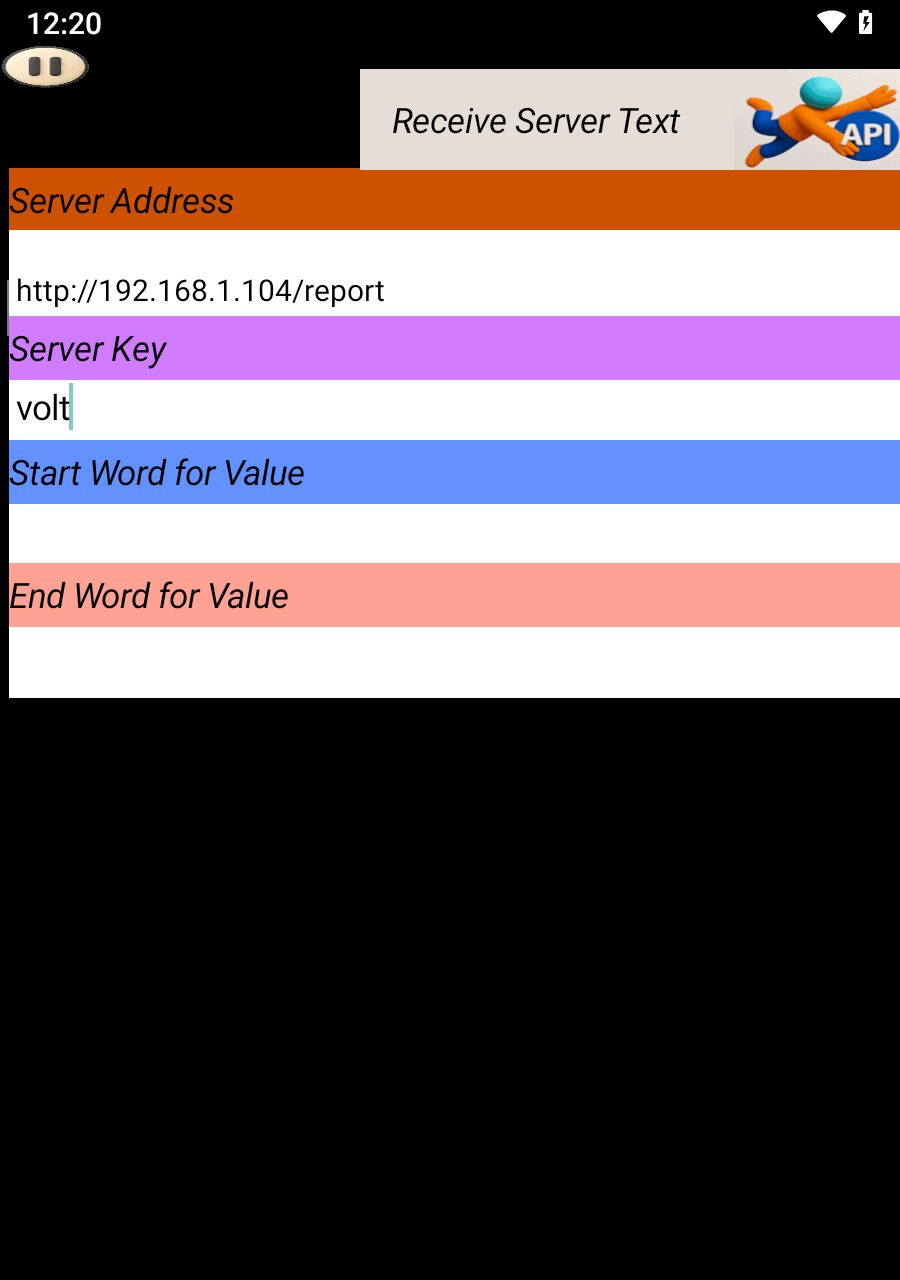
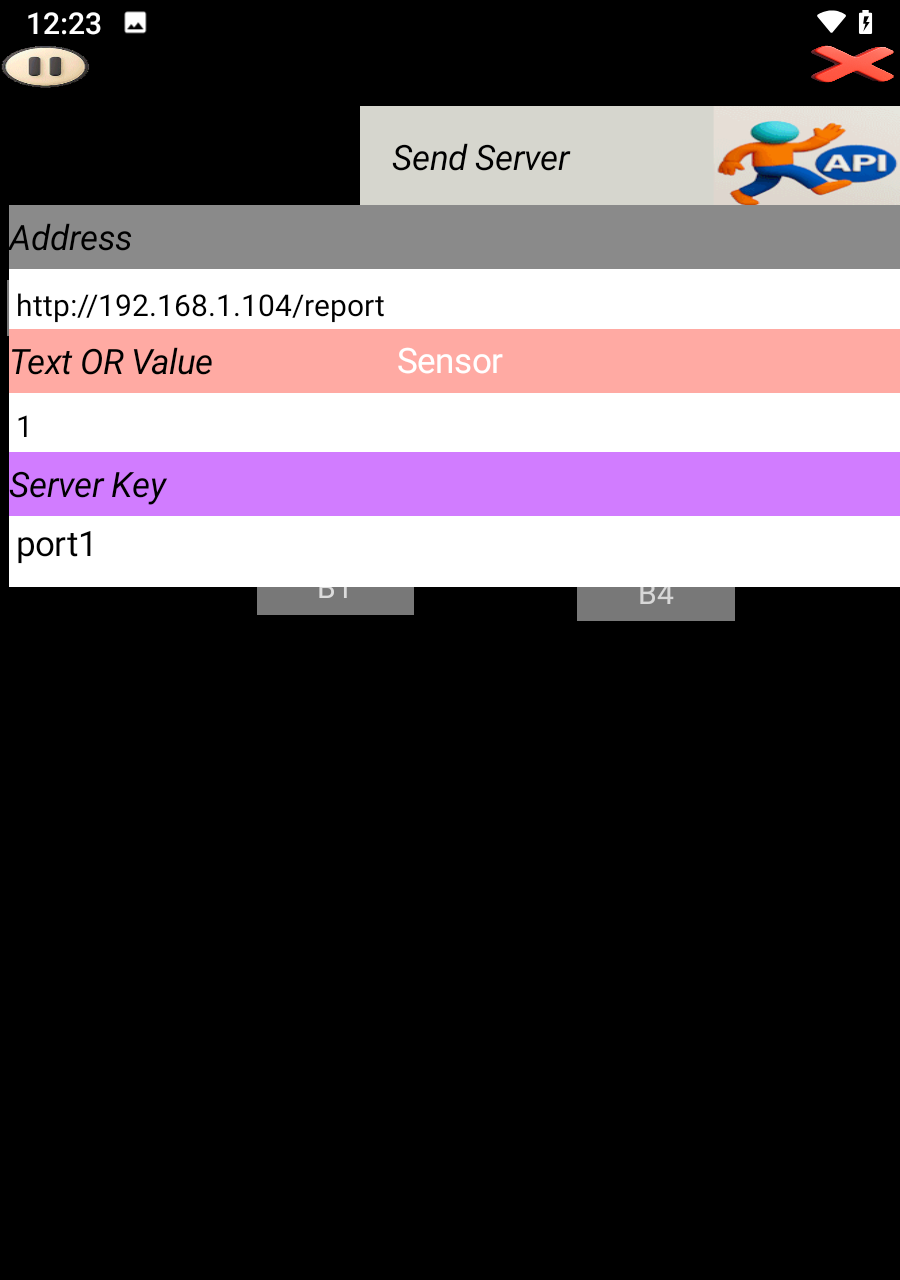
🚀 ESP8266 API Setup with SoifGo
Step 1: Introduction
This tutorial helps you set up the ESP8266 Wi-Fi module and connect it to SoifGo.
Step 2: Preparing the Module
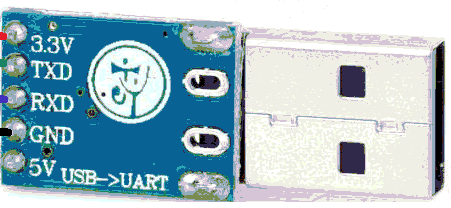
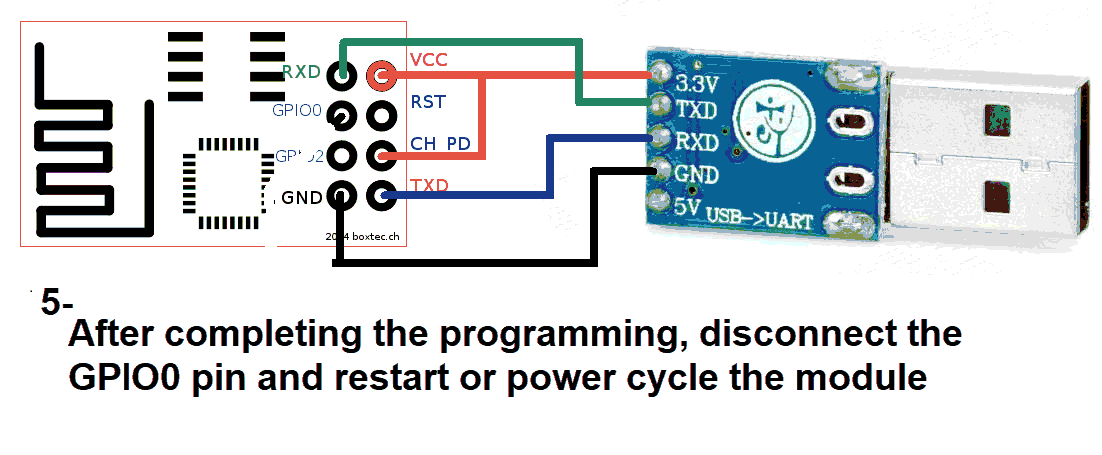
Use a USB to TTL converter. It can be a single USB-to-TTL board or a combination of USB-to-UART and UART-to-TTL.
You'll need both 5V and 3.3V power sources. Recommended converter:
Step 3: Arduino IDE Setup
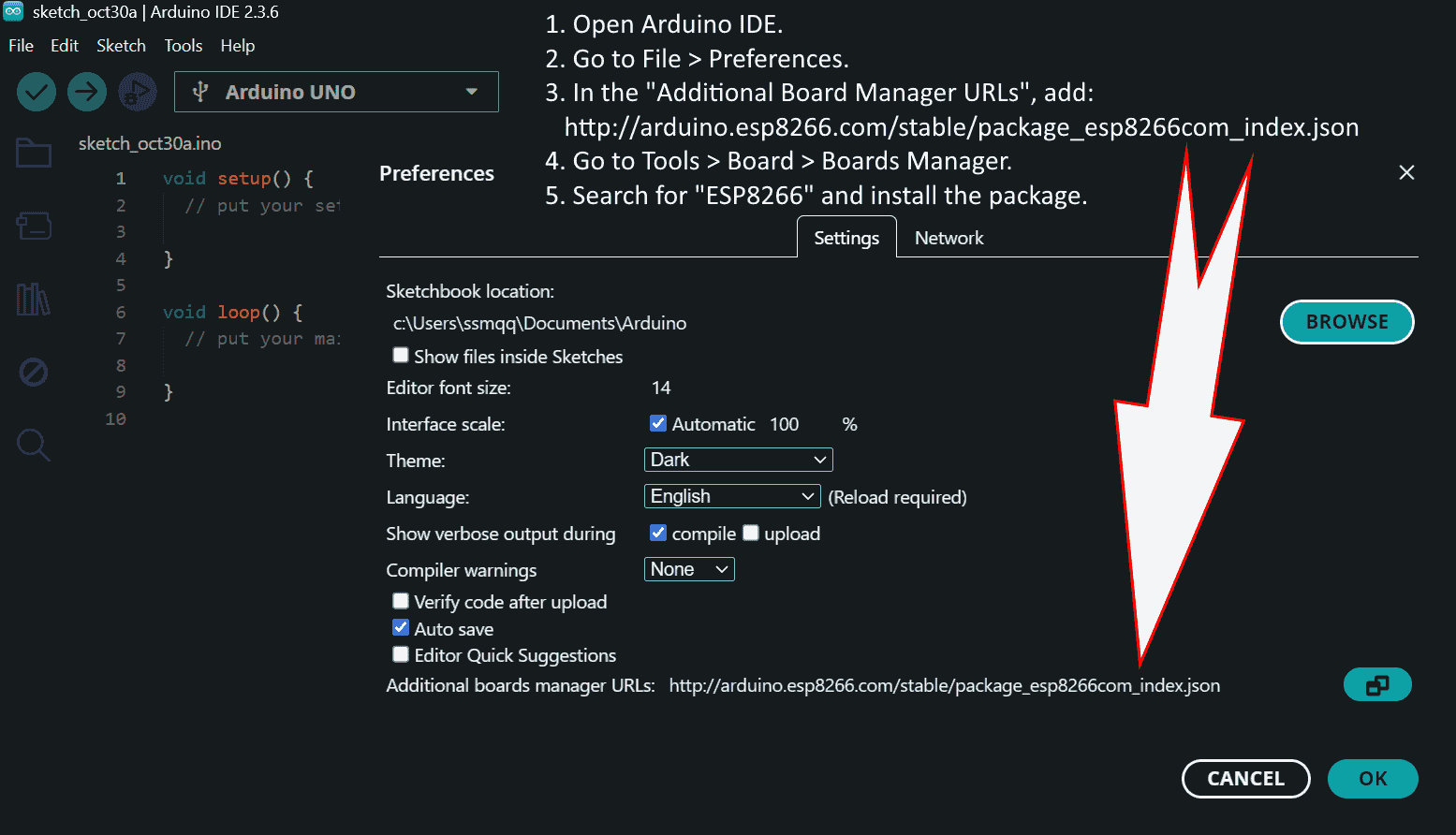
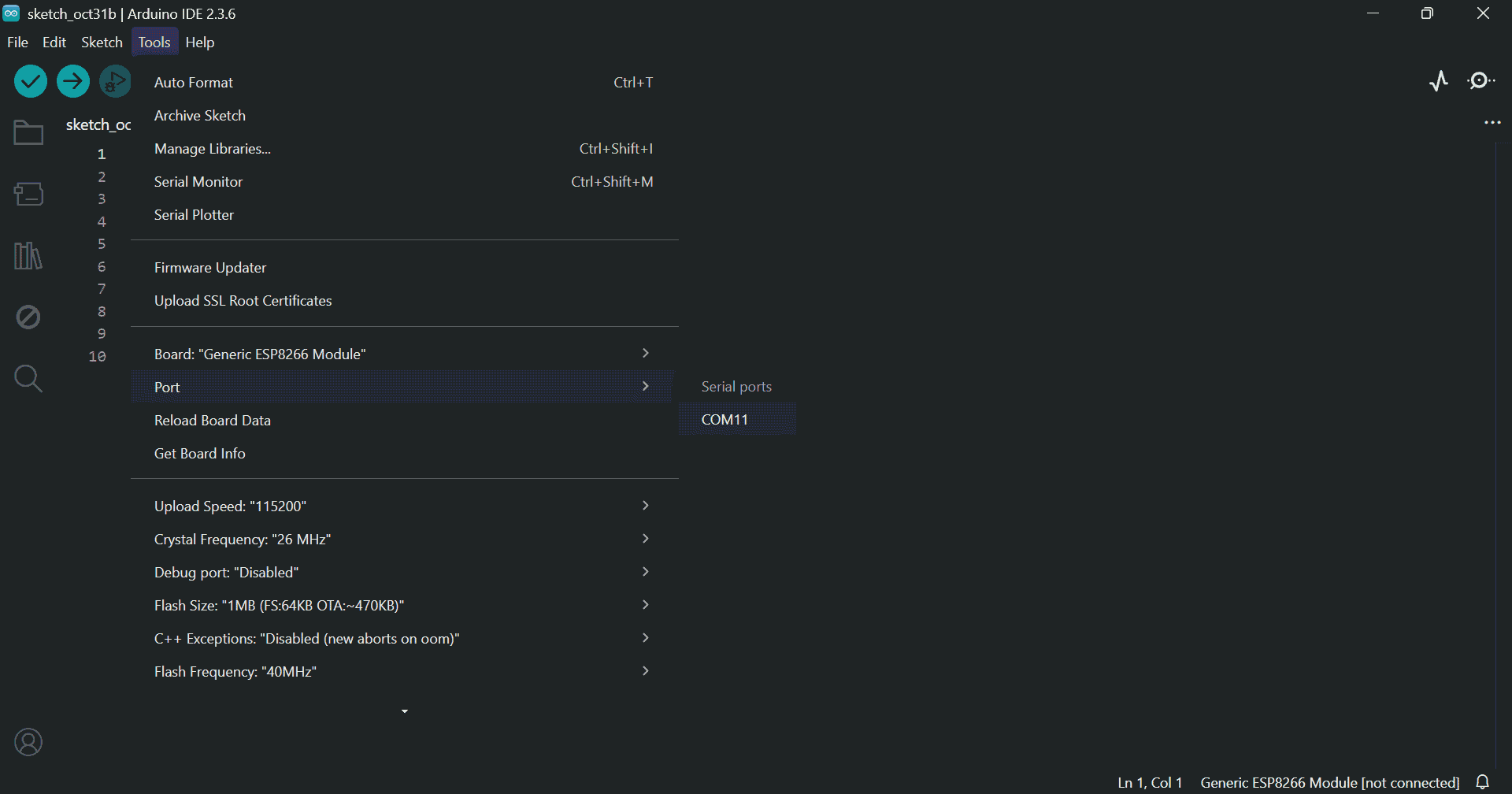
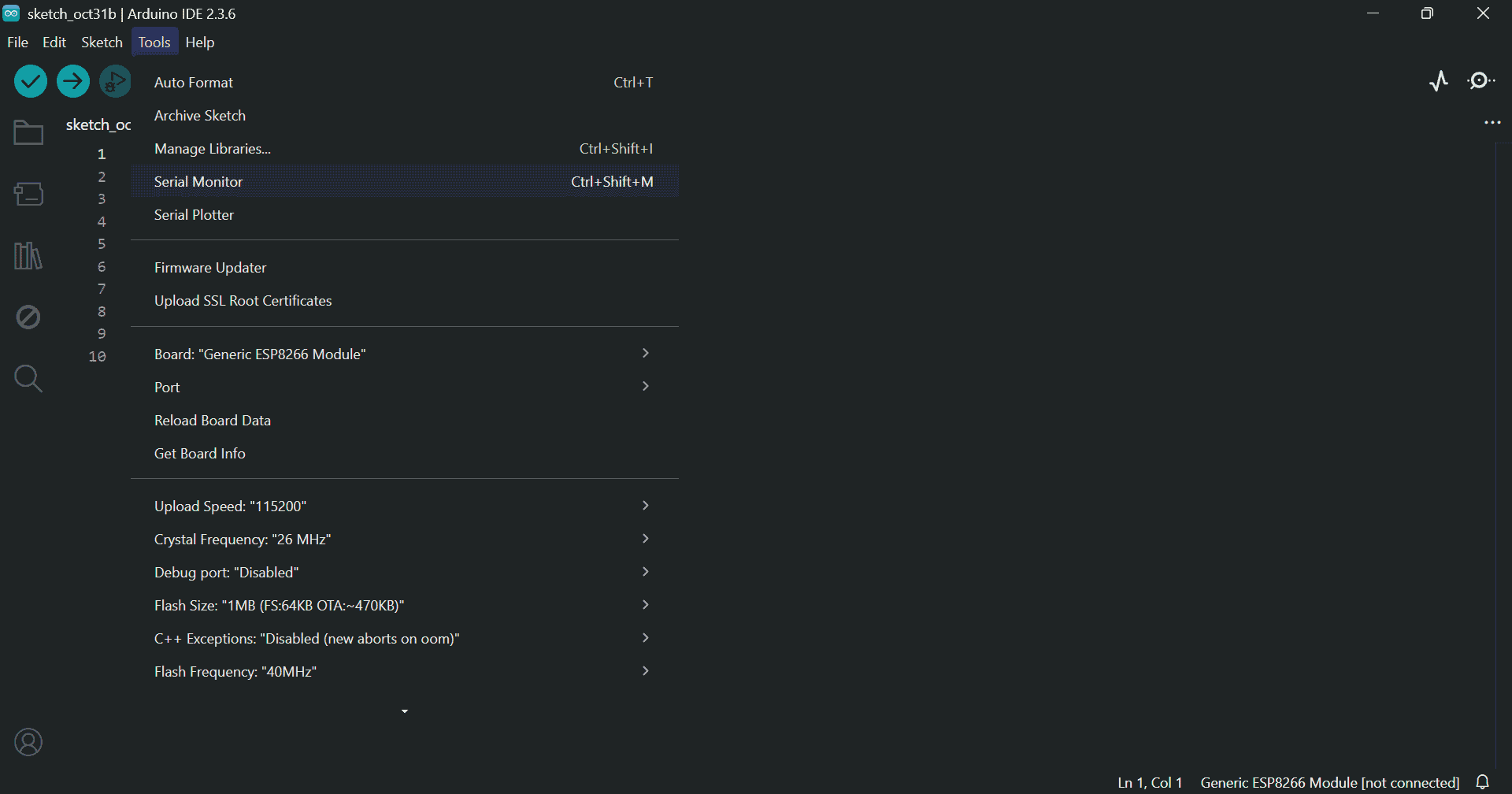
Install the required libraries and check the port and board settings:
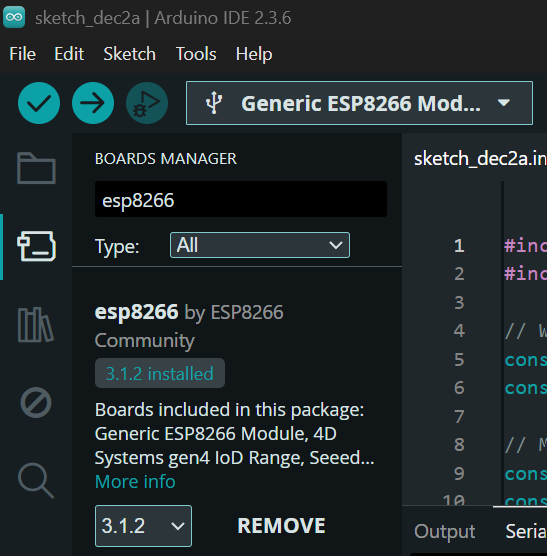
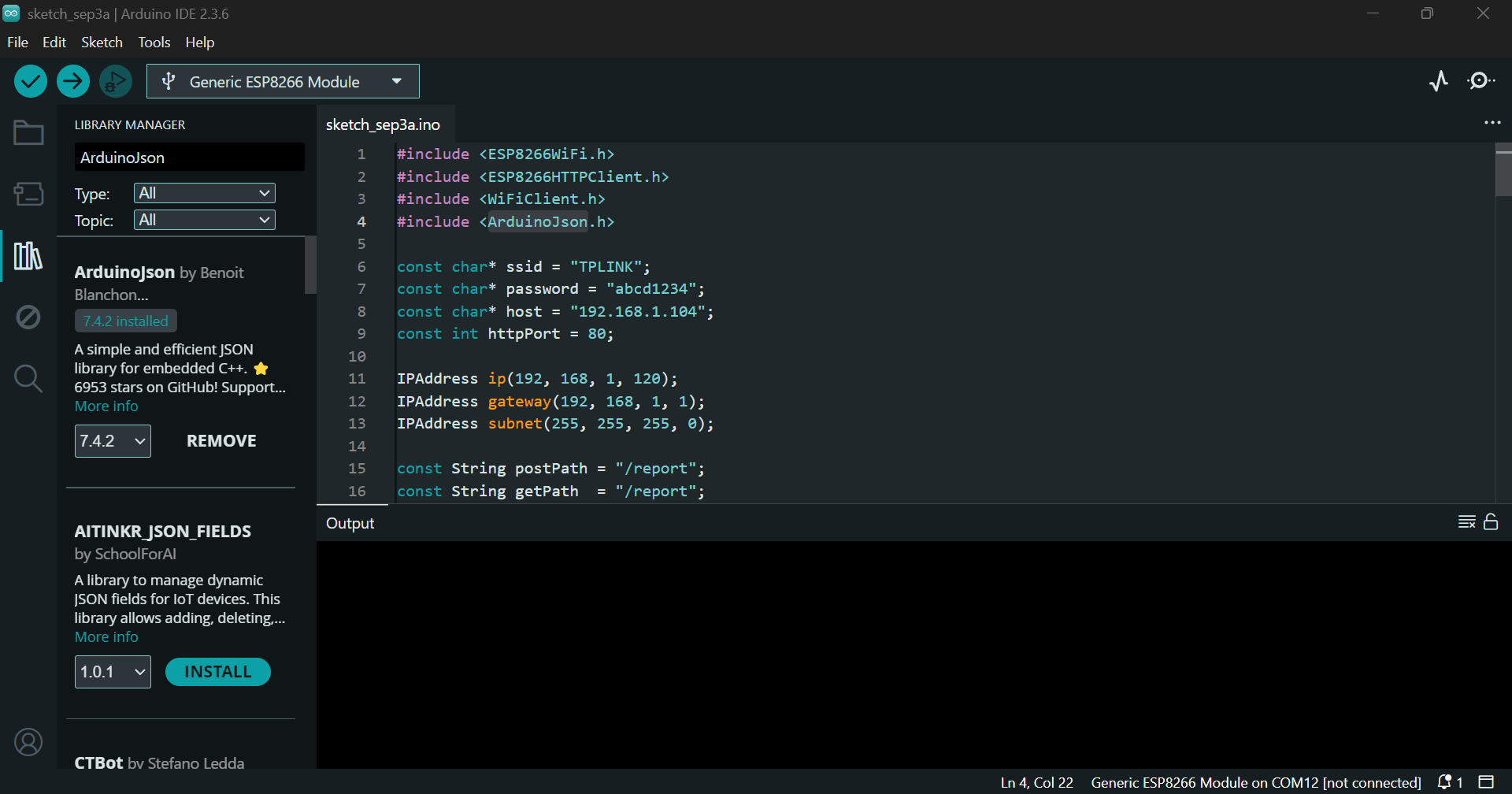
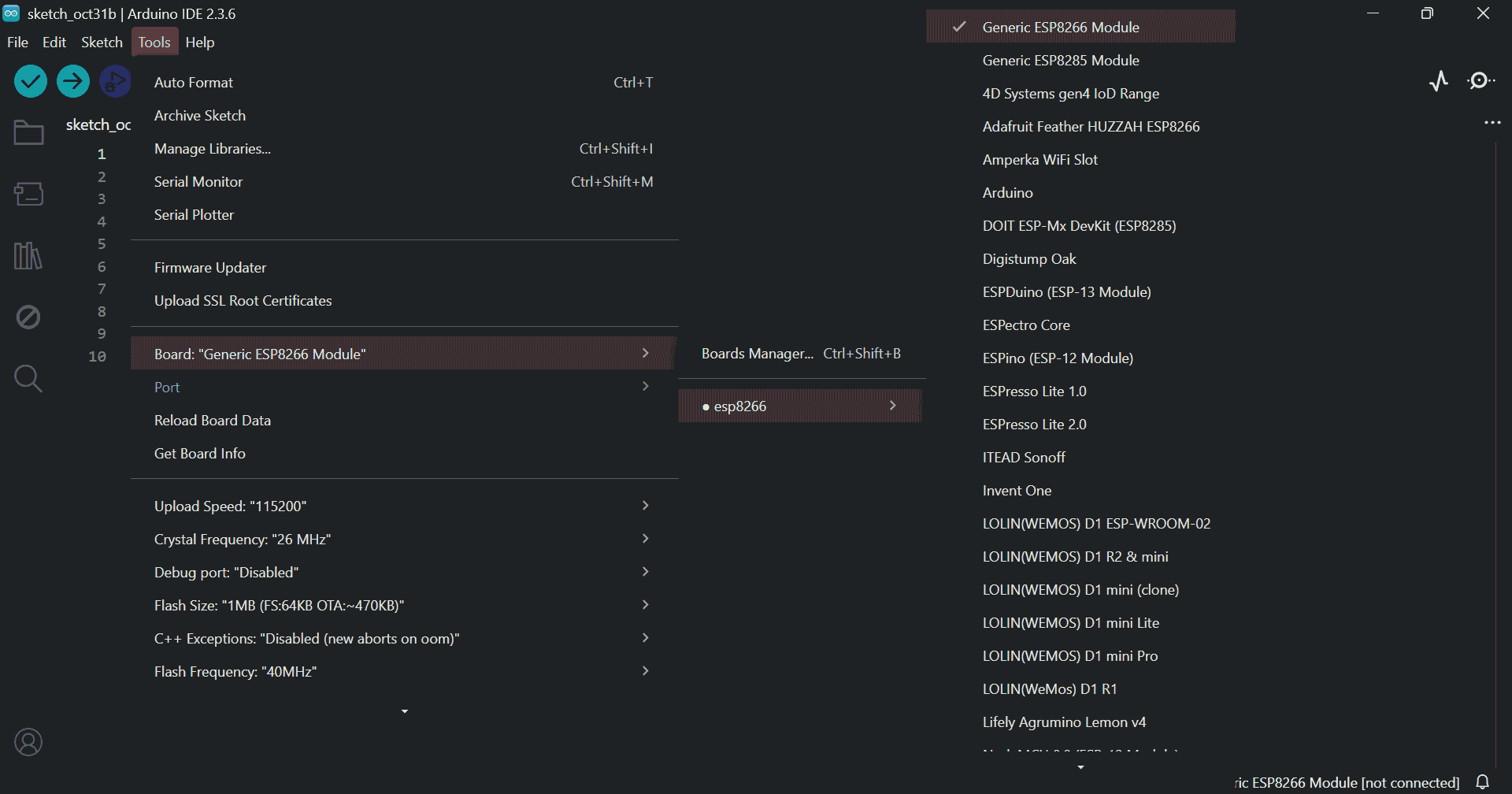
Step 4: Uploading the Program
#include <ESP8266WiFi.h>
#include <ESP8266WebServer.h>
#include <ArduinoJson.h>
#include <EEPROM.h>

#define EEPROM_SIZE 128

String wifiName;
String wifiPass;
int portLastByte;
String userPath;

IPAddress gateway(192, 168, 1, 1);
IPAddress subnet(255, 255, 255, 0);
IPAddress ip;

ESP8266WebServer server(80);
StaticJsonDocument<2048> dataStore;

unsigned long lastCheckTime = 0;

void saveStringToEEPROM(int start, const String& str) {
  for (int i = 0; i < str.length(); i++) {
    EEPROM.write(start + i, str[i]);
    yield();
  }
  EEPROM.write(start + str.length(), '\0');
}

String readStringFromEEPROM(int start) {
  char data[32];
  int i = 0;
  while (i < 31) {
    char c = EEPROM.read(start + i);
    if (c == '\0') break;
    data[i++] = c;
    yield();
  }
  data[i] = '\0';
  return String(data);
}

void saveSettings() {
  saveStringToEEPROM(0, wifiName);
  saveStringToEEPROM(32, wifiPass);
  EEPROM.write(64, portLastByte);
  saveStringToEEPROM(65, userPath);
  EEPROM.write(127, 1);
  EEPROM.commit();
}

void loadSettings() {
  bool isInitialized = EEPROM.read(127) == 1;

  if (isInitialized) {
    wifiName = readStringFromEEPROM(0);
    wifiPass = readStringFromEEPROM(32);
    portLastByte = EEPROM.read(64);
    userPath = readStringFromEEPROM(65);
  } else {
    wifiName = "TPLINK";
    wifiPass = "abcd1234";
    portLastByte = 104;
    userPath = "report";
    saveSettings();
  }

  if (wifiName.length() == 0) wifiName = "TPLINK";
  if (wifiPass.length() == 0) wifiPass = "abcd1234";
  if (portLastByte == 0 || portLastByte > 254) portLastByte = 104;
  if (userPath.length() == 0) userPath = "report";
}

void setup() {
  Serial.begin(115200);
  EEPROM.begin(EEPROM_SIZE);
  loadSettings();

  ip = IPAddress(192, 168, 1, portLastByte);
  WiFi.config(ip, gateway, subnet);
  WiFi.begin(wifiName.c_str(), wifiPass.c_str());

  Serial.println("Connecting to WiFi...");
  unsigned long startAttemptTime = millis();
  while (WiFi.status() != WL_CONNECTED && millis() - startAttemptTime < 10000) {
    delay(500);
    Serial.print(".");
    yield();
  }

  if (WiFi.status() == WL_CONNECTED) {
    Serial.println("\nConnected to WiFi");
    Serial.print("IP Address: ");
    Serial.println(WiFi.localIP());
    Serial.print("MAC Address: ");
    Serial.println(WiFi.macAddress());
  } else {
    Serial.println("\nFailed to connect to WiFi.");
  }

  server.on("/", HTTP_GET, []() {
    server.send(200, "application/json", "{\"message\":\"ESP8266 dynamic key server active\"}");
  });

  server.on("/keys", HTTP_GET, []() {
    JsonArray keys = dataStore.createNestedArray("_keys");
    for (JsonPair kv : dataStore.as<JsonObject>()) {
      if (String(kv.key().c_str()) != "_keys") {
        keys.add(kv.key());
      }
    }
    String response;
    serializeJson(keys, response);
    server.send(200, "application/json", response);
  });

  server.on("/" + userPath, HTTP_GET, []() {
    if (dataStore.containsKey("/" + userPath)) {
      String response;
      serializeJson(dataStore["/" + userPath], response);
      server.send(200, "application/json", response);
    } else {
      server.send(404, "application/json", "{\"status\":\"error\", \"message\":\"No data yet\"}");
    }
  });

  server.on("/" + userPath, HTTP_POST, []() {
    if (server.hasArg("plain")) {
      String body = server.arg("plain");
      StaticJsonDocument<512> incoming;
      DeserializationError error = deserializeJson(incoming, body);
      if (error) {
        server.send(400, "application/json", "{\"status\":\"error\", \"message\":\"Invalid JSON\"}");
        return;
      }

      JsonObject stored;
      if (dataStore["/" + userPath].is<JsonObject>()) {
        stored = dataStore["/" + userPath].as<JsonObject>();
      } else {
        stored = dataStore.createNestedObject("/" + userPath);
      }

      for (JsonPair kv : incoming.as<JsonObject>()) {
        stored[kv.key()] = kv.value();
        if (WiFi.status() == WL_CONNECTED) {
          Serial.println(" " + String(kv.key().c_str()) + ":" + String(kv.value().as<String>()));
        }
        yield();
      }

      String response;
      serializeJson(stored, response);
      server.send(200, "application/json", response);
    } else {
      server.send(400, "application/json", "{\"status\":\"error\", \"message\":\"No data received\"}");
    }
  });

  server.begin();
}

void loop() {
  server.handleClient();
  checkWiFiConnection();
  handleSerialFromMicro();
  yield();
}

void checkWiFiConnection() {
  unsigned long currentTime = millis();
  if (currentTime - lastCheckTime >= 10000) {
    lastCheckTime = currentTime;
    if (WiFi.status() != WL_CONNECTED) {
      WiFi.begin(wifiName.c_str(), wifiPass.c_str());
    }
  }
}

void handleSerialFromMicro() {
  static String serialBuffer = "";
  while (Serial.available()) {
    char c = Serial.read();
    serialBuffer += c;
    yield();

    if (c == '\n') {
      serialBuffer.trim();

      if (serialBuffer.startsWith("#") && serialBuffer.endsWith("*")) {
        String input = serialBuffer.substring(1, serialBuffer.length() - 1);

        if (input.startsWith("wifi=")) {
          wifiName = input.substring(5);
          saveSettings();
          Serial.println("WiFi name changed to: " + wifiName);
        } else if (input.startsWith("pass=")) {
          wifiPass = input.substring(5);
          saveSettings();
          Serial.println("WiFi password changed to: " + wifiPass);
        } else if (input.startsWith("port=")) {
          portLastByte = input.substring(5).toInt();
          saveSettings();
          Serial.println("IP updated: http://192.168.1." + String(portLastByte) + "/" + userPath);
        } else if (input.startsWith("user=")) {
          userPath = input.substring(5);
          saveSettings();
          Serial.println("User path updated: http://192.168.1." + String(portLastByte) + "/" + userPath);
        } else if (input == "reset") {
          wifiName = "TPLINK";
          wifiPass = "abcd1234";
          portLastByte = 104;
          userPath = "report";
          saveSettings();
          Serial.println("Settings reset to default.");
        } else if (input.startsWith("GET:")) {
          String key = input.substring(4);
          if (dataStore.containsKey("/" + userPath)) {
            JsonObject obj = dataStore["/" + userPath];
            if (obj.containsKey(key)) {
              String value = obj[key].as<String>();
              Serial.println(key + ":" + value);
            } else {
              Serial.println(key + ":?");
            }
          } else {
            Serial.println(key + ":?");
          }
        } else {
          int sepIndex = input.indexOf(":");
          if (sepIndex > 0) {
            String key = input.substring(0, sepIndex);
            String value = input.substring(sepIndex + 1);

            JsonObject obj;
            if (dataStore["/" + userPath].is<JsonObject>()) {
              obj = dataStore["/" + userPath].as<JsonObject>();
            } else {
              obj = dataStore.createNestedObject("/" + userPath);
            }

            obj[key] = value;
          }
        }
      }

      serialBuffer = "";
    }

    if (serialBuffer.length() > 256) {
      serialBuffer = "";
    }
  }
}
Download the program file:
📦 Download esp8266.zipPaste the code into Arduino IDE. You can configure Wi-Fi settings before upload:
wifiName = "TPLINK";
wifiPass = "abcd1234";
portLastByte = 104;
userPath = "report";
Or send commands via serial after upload:
#wifi=TPLINK*
#pass=abcd1234*
#port=104*
#user=report*
Step 5: Wiring and Upload
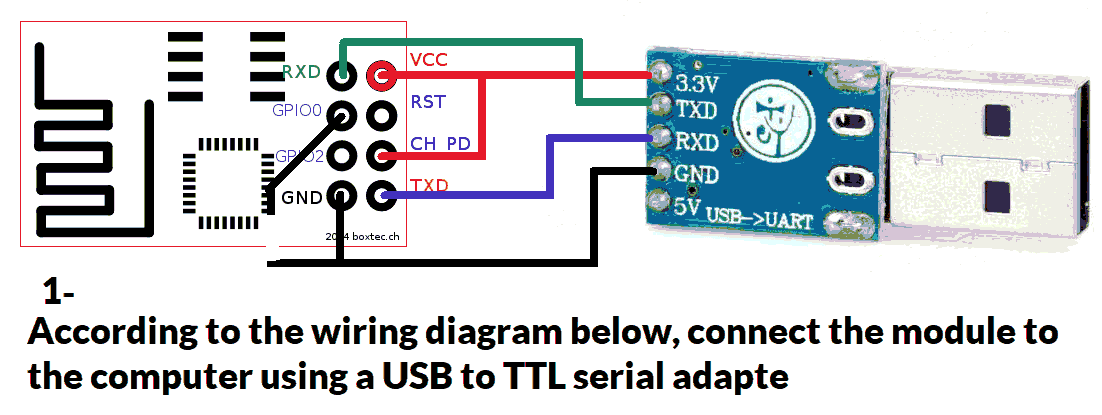
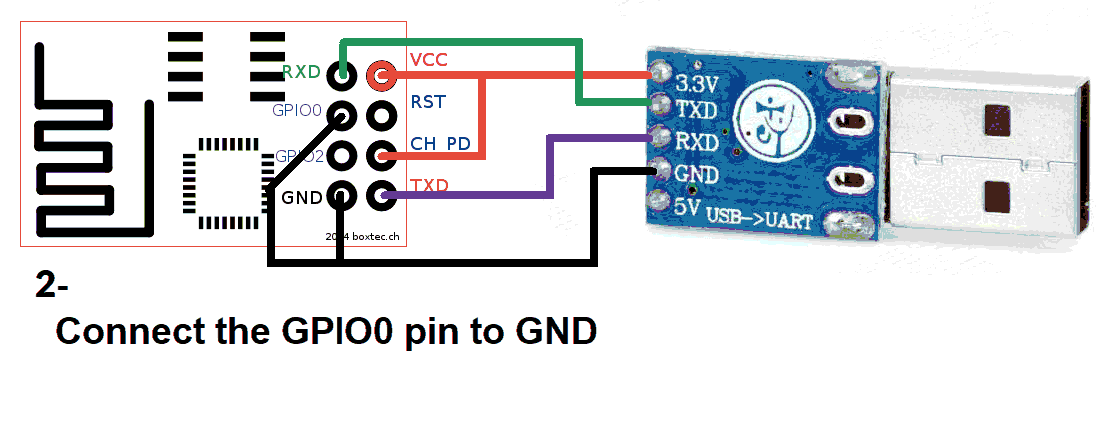
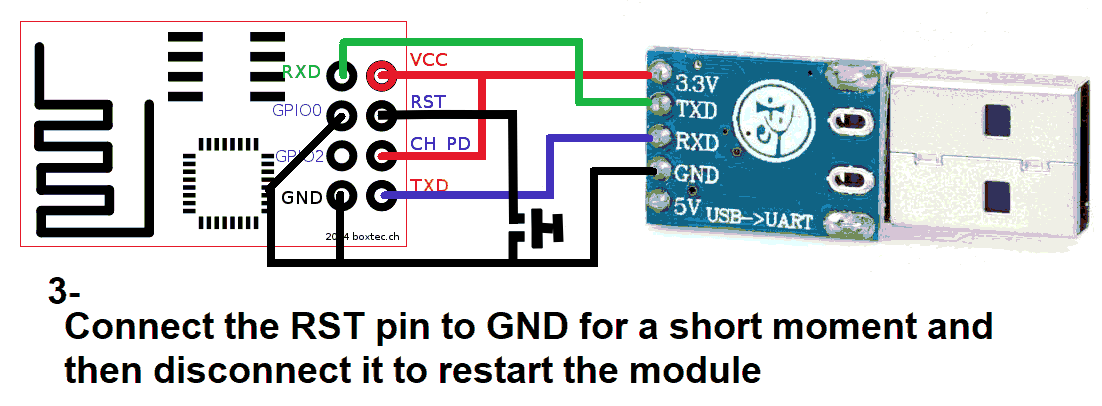
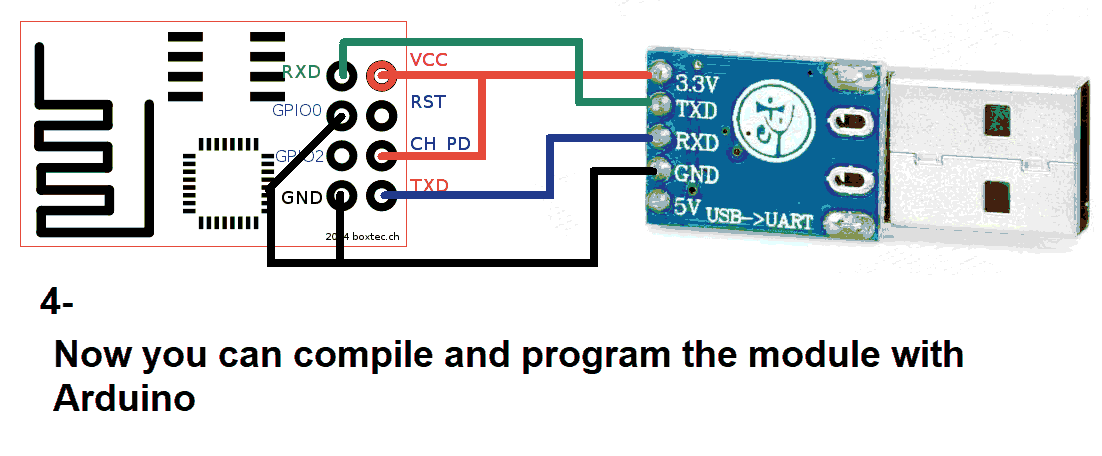
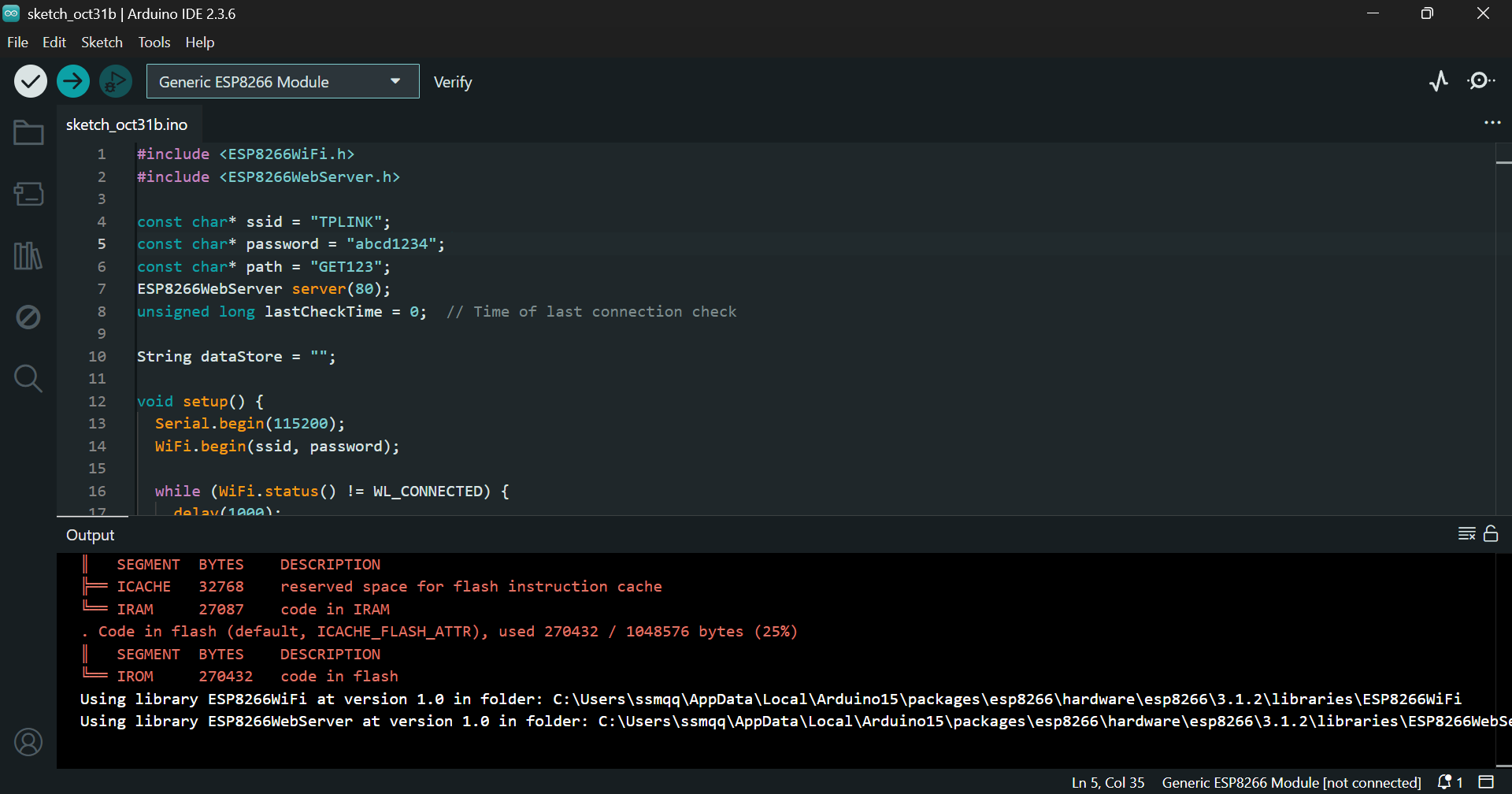
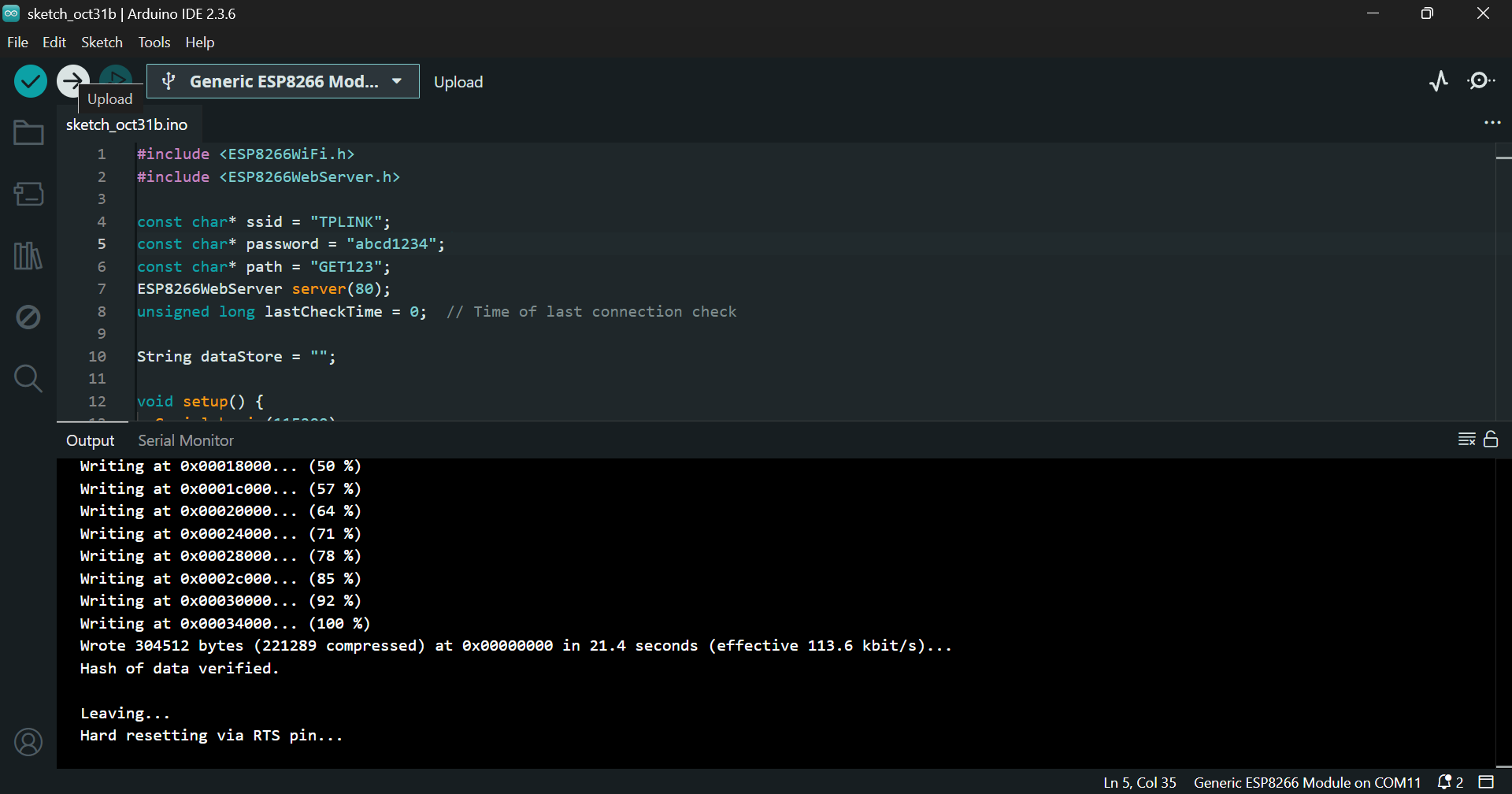
Click Verify and then Upload in Arduino:
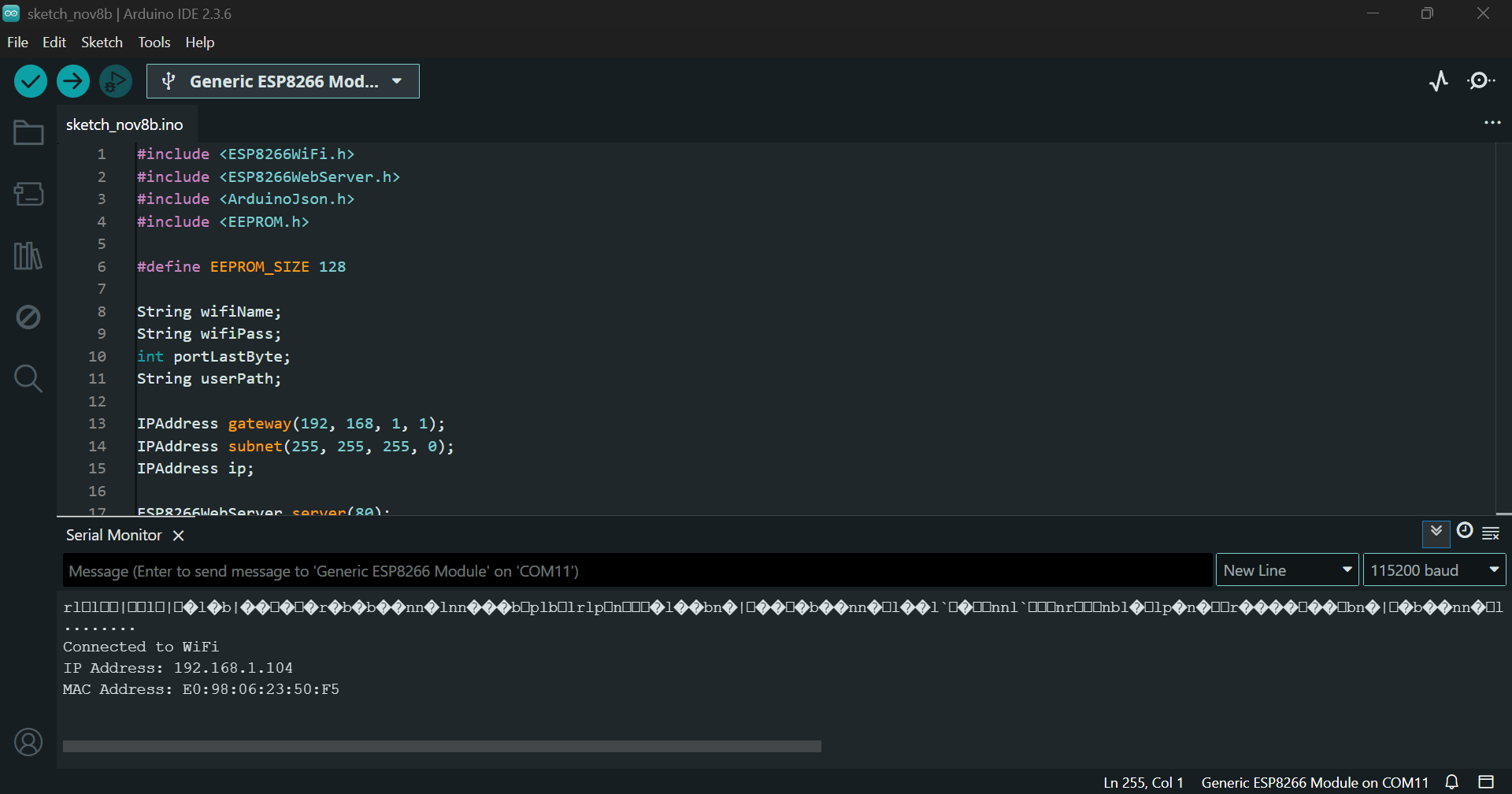
Step 6: Serial Monitor
Restart the module. You should see output like:
Step 7: Microcontroller Connection
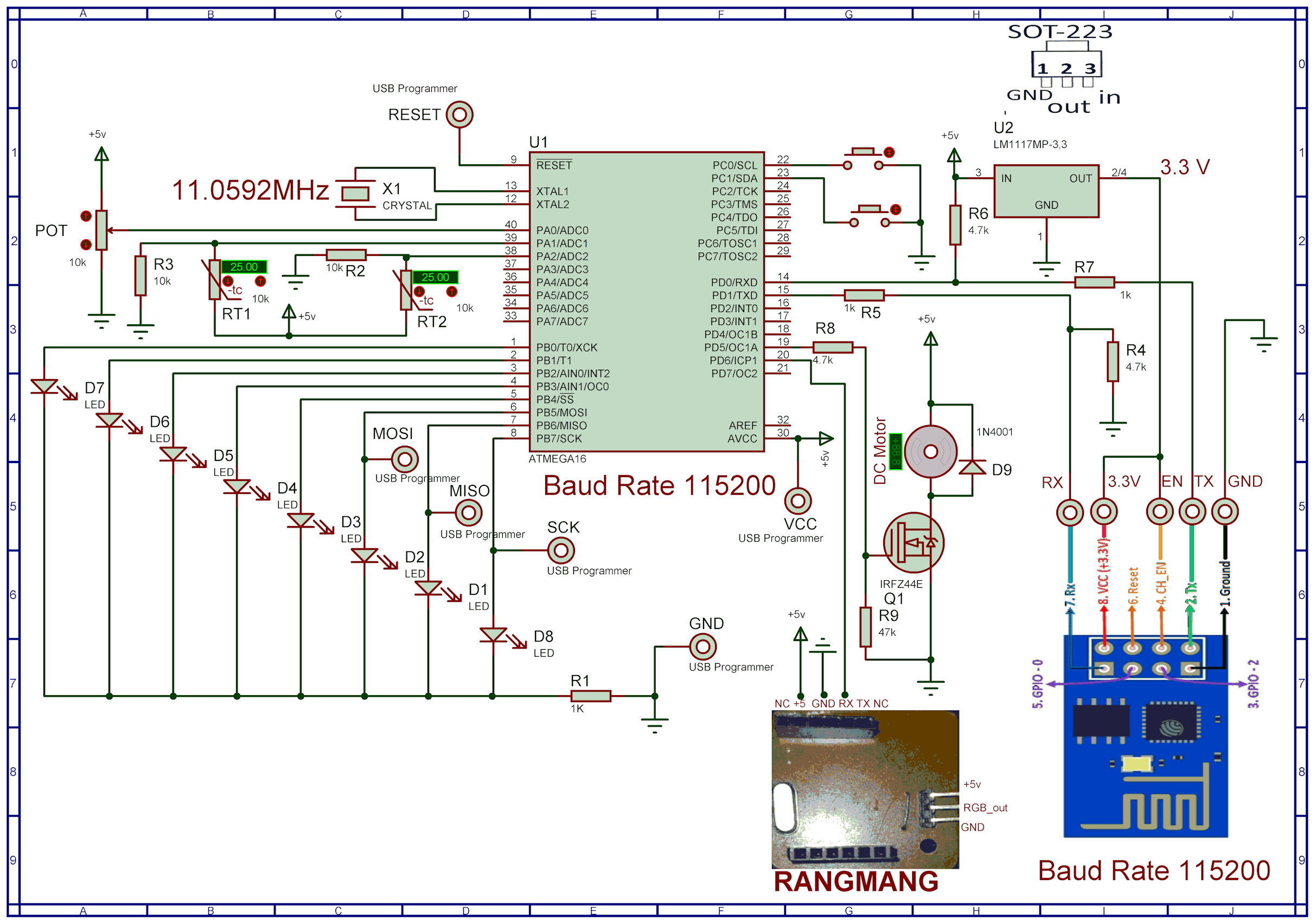
Program your ATmega16 using a compatible programmer:
$regfile = "m16adef.dat"
$crystal = 11059200

Config Adc = Single , Prescaler = Auto , Reference = Avcc
Config Timer1 = Pwm , Pwm = 10 , Compare_a_pwm = Clear_up , Compare_b_pwm = Clear_up , Prescale = 1
Declare Sub Red

CONFIG PORTB=OUTPUT
   Portb = 0
Config Portc.0 = Input
Ddrc.0 = 0 : Portc.0 = 1

Config Portc.1 = Input
Ddrc.1 = 0 : Portc.1 = 1

$baud = 115200

Enable Interrupts

Config Serialin = Buffered , Size = 41 , Bytematch = 13

Dim Text As String * 40
Dim Text2 As String * 4
Dim Text3 As String * 5
DIM TEMP1,LastTemp1 AS WORD
Dim Temp2,LastTemp2 As Word
Dim Volt,pwm1aa As Word
Dim Volt2,LastVolt2 As Single
Dim Step1 As Byte
dim p,t1,i as byte
dim t2 as bit
dim pc,lastpc,pb,lastpb as byte
config watchdog=2048
start watchdog
Readeeprom portb , 1
Waitms 1
Readeeprom pwm1aa , 3
Waitms 1
Open "comd.6:9600,8,n,1" For Output As #1

Print #1 , "soifgo"
pwm1a=pwm1aa
Main:
waitms 30
Incr Step1

reset watchdog

If Step1 >8 Then Step1 = 1

Select Case Step1

Case 1

Volt = Getadc(0)
Volt2 = Volt / 204.8
If Volt2 <> Lastvolt2 Then
Print "#volt:" ; Fusing(volt2 , "#.##") ; "*"
Lastvolt2 = Volt2
End If
Case 2
Temp1 = Getadc(1)
If Temp1 <> Lasttemp1 Then
Print "#temp1" ; ":" ; Temp1 ; "*"
Lasttemp1 = Temp1
End If
Case 3
Temp2 = Getadc(2)
If Temp2 <> Lasttemp2 Then
Print "#temp2" ; ":" ; Temp2 ; "*"
Lasttemp2 = Temp2
End If
Case 4
Pb = Portb
If Pb <> Lastpb Then
Print "#portb" ; ":" ; Bin(portb) ; "*"
Lastpb = Pb
End If
Case 5
Pc = Portc
If Pc <> Lastpc Then
Print "#pinc" ; ":" ; Pinc.0 ; Pinc.1 ; "*"
Lastpc = Pc
End If

case 6
incr p
if p>7 then p=0
Print "#GET:port";p;"*"
End Select

Goto Main

Serial0charmatch:
waitms 20
Input Text

if text <> "" then call Red
Return

Sub Red
Reset Watchdog

Text = Trim(text)
Text = Ltrim(text)

If Instr(text , "rang") > 0 Then
Disable Interrupts
Print #1 , Mid(text , 6 , 36)
Enable Interrupts
End If

If Instr(text , "pwm1a") > 0 Then
Text3 = Mid(text , 7 , 4)
Pwm1a = Val(text3)
Writeeeprom pwm1a , 3
End If

If Instr(text , "port") > 0 Then
Text2 = Mid(Text , 7 , 1)
Text = Mid(text , 5 , 1)

if text2="0" then t2=0
if text2="1" then t2=1

t1=val(text)

If T1 < 8 Then Portb.t1 = T2

If T1 = 9 Then

if t2=1 then
Portb = 255
For I = 0 To 7
Print "#port" ; I ; ":1*"
Waitms 50
Next
End If

if t2=0 then
portb=0
for i=0 to 7
Print "#port";i ; ":0*"
waitms 50
next
end if

end if
Writeeeprom Portb , 1

End If

Text = ""
Text2 = ""
Text3 = ""
T1 = 222
T2 = 0
Clear Serialin

End Sub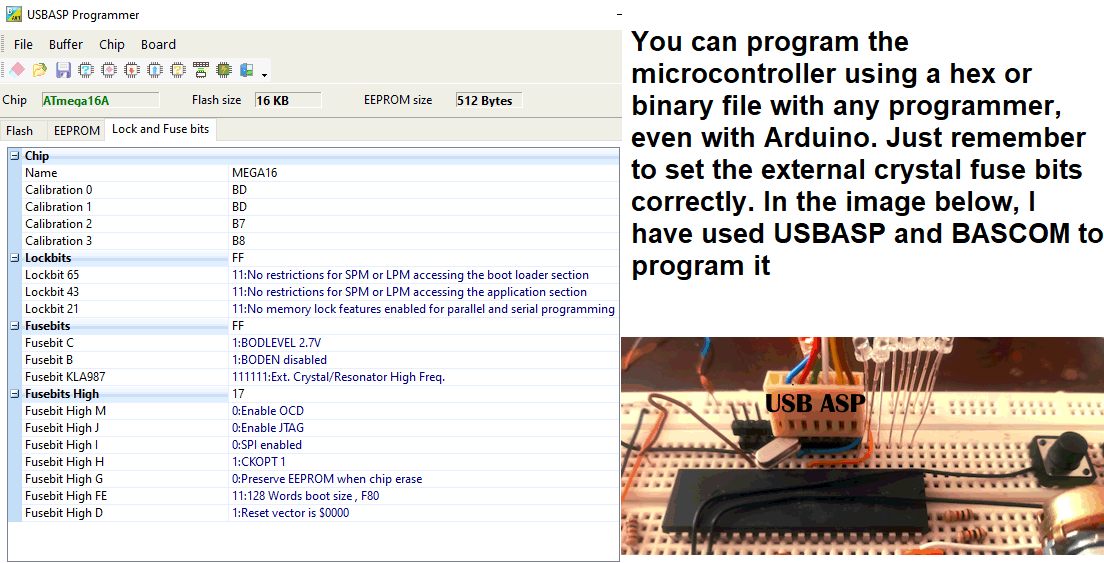
Step 8: Testing in Browser
Visit:
http://192.168.1.104/report
You should see:
{"volt":"3.16","temp1":"3","temp2":"513","portb":"00000000"}Step 9: SoifGo Integration