⚙️ Speed Control with SoifGo
💡
Control two DC motors independently over Bluetooth using a TDA7073A motor driver and software PWM on Arduino Uno.
🔌 Compatible Motor Driver Chips (Dual DC Motor)
| Chip | Max Current per Channel | Voltage Range | Notes |
|---|---|---|---|
| TDA7073A | 600 mA | 3V – 18V | The one used here; great for small motors |
| L293D | 600 mA | 4.5V – 36V | Very common but old; high voltage drop |
| SN754410 | 1A | 4.5V – 36V | Improved L293 with thermal protection |
| TA7291P | 1A (2A peak) | 4.5V – 20V | Designed for DC motors; built-in flyback diodes |
| TB6612FNG | 1.2A (3.2A peak) | 15V max | Very efficient, low drop; modern L293D replacement |
| DRV8833 | 1.5A (2A peak) | 2.7V – 10.8V | Battery-friendly; full protection features |
| MX1508 | 1.5A (2.5A peak) | 1.8V – 10V | Very cheap; ideal for toys and small robots |
📖 About the Speed Control Example
This Arduino sketch lets you control the speed of two DC motors independently over Bluetooth using a TDA7073A motor driver. It uses software PWM (no hardware PWM pins required) and communicates via the Arduino Uno's built-in hardware serial (pins 0 and 1).
⚠️ Important — Software PWM:
Unlike the typical
Unlike the typical
analogWrite() approach, this sketch generates PWM in software inside loop(). This means:
- Any output pin can be used (here:
A2, A3, A4, A5). - The PWM frequency is low (~a few hundred Hz) and depends on loop speed.
- Serial parsing is done in the same loop, so keep commands short.
How it works
setup()— Configures the four motor driver pins (M11, M12, M21, M22) as outputs, sets them LOW (motors stopped), and starts serial communication at 9600 baud.loop()— Runs the software PWM for both motors and checks for incoming serial data.- Motor 1 (A): If
stopm1is false,spd1increments each loop. Whilespd1 < pw1, the motor is driven in the direction set bydir1. Whenspd1exceedspw1, the motor is turned off for the rest of the cycle. - Motor 2 (B): Same logic using
spd2,pw2, anddir2. parseSerial()— Called when a newline is received. Parses the accumulatedtextstring for commands.
Commands accepted
| Command | Action |
|---|---|
FWD | Motor 1 forward (dir1 = true) |
BACK | Motor 1 backward (dir1 = false) |
LEFT | Motor 2 left (dir2 = true) |
RIGHT | Motor 2 right (dir2 = false) |
STOP | Stop both motors (stopm1 = true; stopm2 = true) |
SPD_A:200 | Set Motor A speed (0–255) → pw1 |
SPD_B:150 | Set Motor B speed (0–255) → pw2 |
📌 Note: After each valid command, the sketch prints the current speed values:
pw1 pw2 (e.g. 55 55). This is useful for debugging but is not a formal acknowledgment.
📜 Full Arduino Sketch
/*
  SoifGo — Speed Control  for TDA7073A (Software PWM)

  Target: Arduino Uno R3 (ATmega328P)
*/

// ============================================
// PIN CONFIGURATIONS (same as Bascom)
// ============================================
const byte M11 = A2;  // PORTC.2
const byte M12 = A3;  // PORTC.3
const byte M21 = A4;  // PORTC.4
const byte M22 = A5;  // PORTC.5

// ============================================
// VARIABLES
// ============================================
bool dir1 = false;
bool dir2 = false;
bool stopm1 = true;
bool stopm2 = true;

byte spd1 = 0;
byte spd2 = 0;
byte pw1 = 55;
byte pw2 = 55;

String text = "";
String text2 = "";

// ============================================
// SETUP
// ============================================
void setup() {
  pinMode(M11, OUTPUT);
  pinMode(M12, OUTPUT);
  pinMode(M21, OUTPUT);
  pinMode(M22, OUTPUT);

  // All motors stopped initially
  digitalWrite(M11, LOW);
  digitalWrite(M12, LOW);
  digitalWrite(M21, LOW);
  digitalWrite(M22, LOW);

  Serial.begin(9600);
}

// ============================================
// SOFTWARE PWM LOOP
// ============================================
void loop() {
  // ---- Motor 1 (A) ----
  if (!stopm1) {
    spd1++;
    if (pw1 > spd1) {
      if (!dir1) {
        digitalWrite(M11, HIGH);
        digitalWrite(M12, LOW);
      } else {
        digitalWrite(M11, LOW);
        digitalWrite(M12, HIGH);
      }
    } else {
      digitalWrite(M11, LOW);
      digitalWrite(M12, LOW);
    }
  } else {
    digitalWrite(M11, LOW);
    digitalWrite(M12, LOW);
  }

  // ---- Motor 2 (B) ----
  if (!stopm2) {
    spd2++;
    if (pw2 > spd2) {
      if (!dir2) {
        digitalWrite(M21, HIGH);
        digitalWrite(M22, LOW);
      } else {
        digitalWrite(M21, LOW);
        digitalWrite(M22, HIGH);
      }
    } else {
      digitalWrite(M21, LOW);
      digitalWrite(M22, LOW);
    }
  } else {
    digitalWrite(M21, LOW);
    digitalWrite(M22, LOW);
  }

  // ---- Serial parse ----
  if (Serial.available()) {
    char c = Serial.read();
    if (c == '\r' || c == '\n') {
      if (text.length() > 1) {
        parseSerial();
      }
      text = "";
    } else {
      text += c;
    }
  }
}

// ============================================
// PARSE SERIAL
// ============================================
void parseSerial() {
  if (text.indexOf("FWD") >= 0) {
    dir1 = true;
    stopm1 = false;
  }
  if (text.indexOf("BACK") >= 0) {
    dir1 = false;
    stopm1 = false;
  }
  if (text.indexOf("LEFT") >= 0) {
    dir2 = true;
    stopm2 = false;
  }
  if (text.indexOf("RIGHT") >= 0) {
    dir2 = false;
    stopm2 = false;
  }
  if (text.indexOf("STOP") >= 0) {
    stopm1 = true;
    stopm2 = true;
  }
  if (text.indexOf("SPD_A:") >= 0) {
    text2 = text.substring(6, 9);
    pw1 = text2.toInt();
  }
  if (text.indexOf("SPD_B:") >= 0) {
    text2 = text.substring(6, 9);
    pw2 = text2.toInt();
  }

  Serial.print(pw1);
  Serial.print("   ");
  Serial.println(pw2);

  text = "";
  text2 = "";
}📝 Wiring notes for Arduino Uno R3
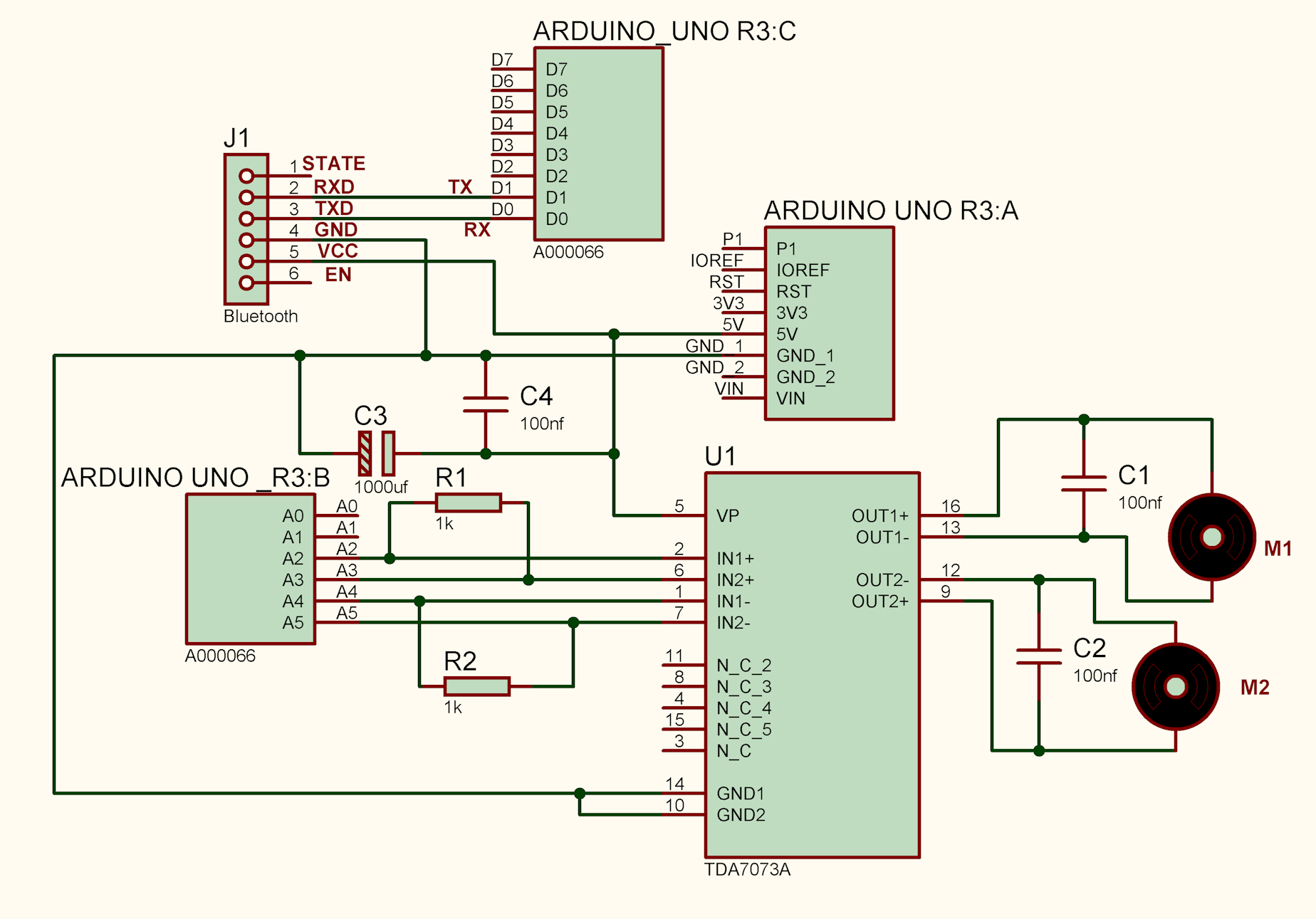
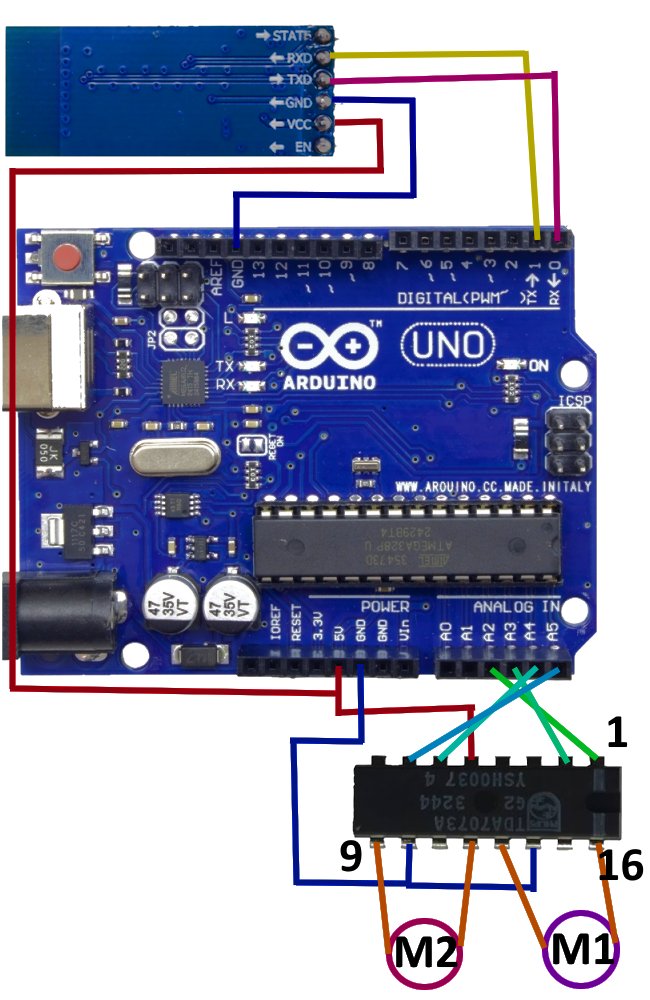
- Bluetooth module (HC-05 / JDY-31): connects to the Arduino's hardware serial — module TX → Arduino RX (pin 0), module RX → Arduino TX (pin 1) (use a voltage divider if the module is 3.3V).
- Motor driver pins: M11 = A2, M12 = A3 (Motor 1), M21 = A4, M22 = A5 (Motor 2).
-
For TDA7073A, each motor is driven by a pair of inputs (IN+ / IN-).
Connect
M11→ IN1+,M12→ IN1-,M21→ IN2+,M22→ IN2-. - Because the sketch uses hardware serial, disconnect the Bluetooth module while uploading the sketch to avoid conflicts.
🖼️ Schematic (Arduino Uno R3 Target)
🎬 Test Video
Speed Control test — two motors with independent speed (TDA7073A, software PWM)